Free Keyword Search Volume Checker
See how many people search for any keyword every month, in any country or city, and how that number changes over the year.
 Rated 4.7/5 on G2 and 4.8/5 on Capterra
Free account • No credit card needed • 5 searches a day
- Search volume is the number of times people search for a keyword in a month, usually shown as an average of the last 12 months.
- It's an estimate: Google doesn't publish exact search volumes, so every tool shows a slightly different number.
- The average hides seasonality: Check the volume of each month before you plan content, especially for seasonal keywords.
- Search volume isn't traffic: How many visits you get depends on your position, the SERP features and the competition.
What you get with the Mangools search volume checker
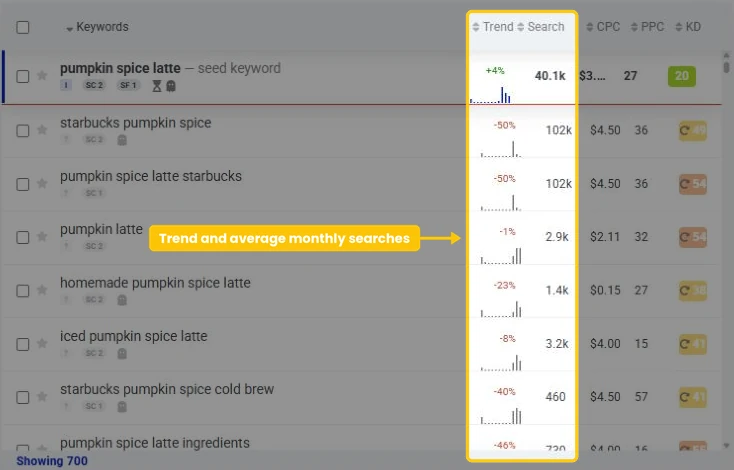
Type in a keyword and KWFinder shows its search volume, together with hundreds of related keywords and their volumes.
Exact monthly averages
One number for every keyword, not a wide range like "1K-10K".
Any country, region or city
Search volume for more than 52,000 locations and 43 languages, from whole countries down to cities and neighborhoods.
The volume of every month
A chart with the search volume of each month, years back, so you can spot seasonal peaks at a glance.
Your choice of period
Switch the average between the last known 12 months and the last 12, 6 or 3 months.
Trend at a glance
A 12-month trend line and how much the interest grew or dropped compared with the same months a year earlier.
Bulk checks
Import your own list of keywords and get search volume, KD, CPC and more for all of them at once.
What is keyword search volume?
Keyword search volume is the number of times people search for a keyword in a search engine in a given period, usually a month. Most SEO tools, KWFinder included, show it as a monthly average of the last 12 months.
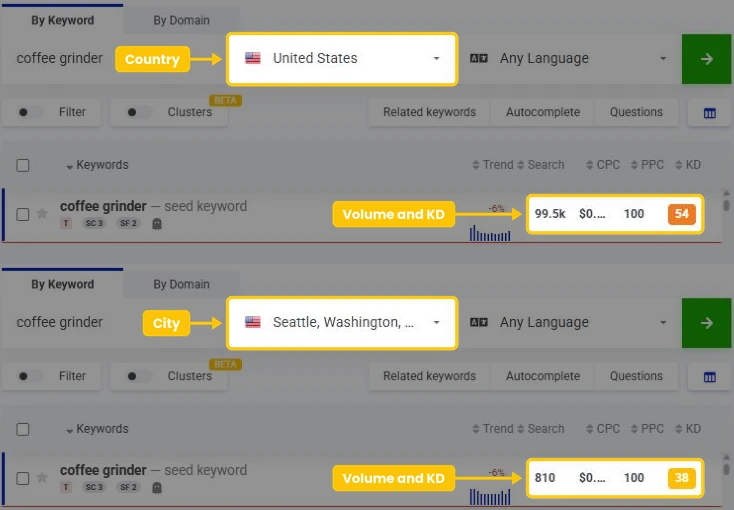
Search volume always belongs to a location and a language. In KWFinder, "coffee grinder" gets 99,500 searches a month in the whole United States, but just 810 in Seattle.
It's a measure of demand: how many people you could reach if your page ranks for the keyword. That's why it's one of the first numbers to check in keyword research.
Note: Search volume counts searches in Google. Questions people ask ChatGPT or other AI assistants aren't part of it.
Search volume vs. impressions vs. traffic
These 3 numbers often get mixed up, but each one tells you something else:
| Metric | What it measures | Where you see it |
|---|---|---|
| Search volume | How many times people search for a keyword, no matter who ranks | KWFinder and other keyword research tools |
| Impressions | How many times your page showed up in Google for a query | Google Search Console |
| Clicks (traffic) | How many people clicked through to your page | Google Search Console |
A keyword with 10,000 searches won't bring you 10,000 visits, even at position 1. Some people click ads, some get their answer in an AI Overview and some don't click at all. The Estimated visits (EV) column in KWFinder shows how many visits each position gets.
Where does search volume data come from?
Google doesn't show search volume in its search results. The numbers you see in SEO tools come from 3 main sources:
- Google Keyword Planner - Google's own tool for advertisers. It shows the average monthly searches for a keyword and its close variants over 12 months. Accounts with little or no ad spend often see only ranges, like "1K-10K".
- Clickstream data - anonymized browsing data from a panel of real users, often collected through browser extensions and apps. Tools use it to estimate how often everyone searches for a keyword.
- Statistical models - most tools combine several sources and fill the gaps with their own models.
Mangools gets search volume from several data providers and processes it before KWFinder shows it. You get one number for every month, for each keyword, location and language.
How KWFinder calculates the number you see
KWFinder calculates everything you see from these monthly numbers. Here's what happens to them:
- The average - Last known, the default, averages the 12 newest months that have data, even if the latest month isn't in yet. Last 12 mo. is a ready-made 12-month average, so it can differ a little from Last known.
- Rounding - averages are rounded down to keep the numbers readable: 1,234 shows as 1,200, and anything under 10 shows as 10.
- Missing data - when there are no recorded searches, KWFinder doesn't make up a number. A period without data shows 0 in the list and N/A in the right panel.
- Older data - for a few keywords, often on sensitive topics, new months stop coming in. KWFinder then shows the latest data it has, and the Monthly Searches chart shows which months that is.
- Search by Domain - next to a competitor's keywords, the volume is the one KWFinder used to estimate their visits. Hover over the number to see today's volume.
Why search volume differs between tools
Check the same keyword in 3 tools and you'll likely get 3 different numbers. That's normal. The most common reasons are:
- Different sources and models - every tool has its own mix of data and its own way of processing it.
- Close variants - Google often reports one number for a whole group of similar keywords. KWFinder shows separate numbers for most variants (in the US, "optimization" gets 58,600 searches a month and "optimisation" 2,800), but some keywords still share one number. "Competitor keyword research" and "competitor keyword analysis" both show 920.
- Period - a 12-month average is a different number than the last 3 months. KWFinder's default, Last known, averages the 12 newest months it has.
- Rounding - tools round their averages in different ways, and KWFinder rounds them down.
- Location and language - the same keyword has a different volume in Anywhere, in a country and in a city.
So which number should you trust? Pick one tool and compare keywords within it. The difference between two keywords in the same tool tells you much more than the exact number.
Tip: Don't add up the volumes of similar keywords that show exactly the same number. They're usually one group of close variants, counted once.
How to check if a search volume is realistic
No tool knows the exact number, but you can check whether a number makes sense:
- Compare it with your own data: Pick a keyword you rank for in the top 3 and open its impressions in Google Search Console for the last 12 months. Divide them by 12 and compare the result with the search volume. At the top of page 1, your page shows up in almost every search, so your impressions get close to the real number of searches.
- Look at the monthly chart: If one or two months are much higher than the rest, a seasonal peak pulls the average up. The keyword doesn't get that many searches every month.
- Look at the recent months: For a keyword that's growing fast, the 12-month average lags behind the demand of today. Switch the period to Last 3 mo. to see the average of the most recent months.
Is Google Trends a search volume tool?
Not quite. Google Trends shows how popular a search term is compared with its own peak, on a scale from 0 to 100, not how many people search for it. A value of 100 is the term's highest point in the place and period you chose, so it says nothing about the number of searches.
It's great for comparing terms, spotting seasons and catching new trends early. For the actual number of searches, use a search volume checker.
How to check Google search volume in KWFinder
Checking search volume takes a few seconds. Here's how to get the most out of it:
1. Enter your keyword, location and language
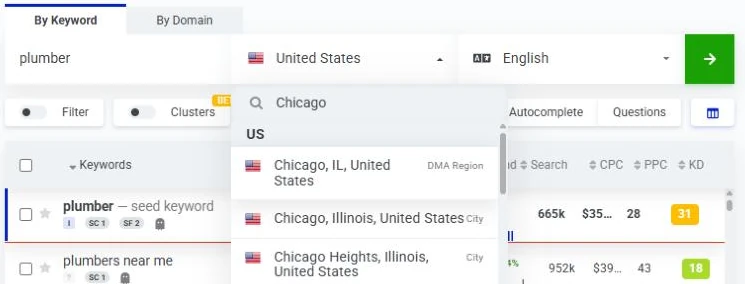
Type in a keyword and choose where your audience is. You can pick from more than 52,000 locations (countries, regions, cities and neighborhoods) and 43 languages.
The Search column shows the average monthly volume of every keyword, and the panel on the right shows the volume of the keyword you selected.
2. Choose the period
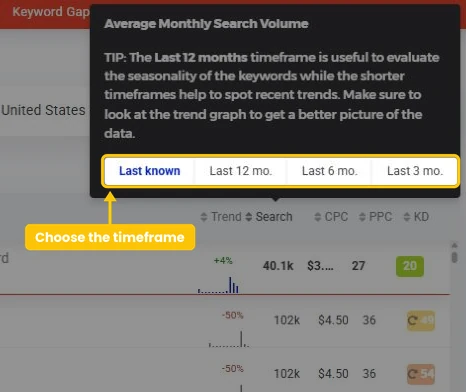
Hover over the Search column header and choose the period for the average:
- Last known - the average of the 12 newest months KWFinder has. This is the default.
- Last 12 mo. - a 12-month average that comes ready-made with the keyword's data.
- Last 6 mo. and Last 3 mo. - the average of the most recent months.
A longer period shows the whole year, seasons included. A shorter one shows what's happening right now. KWFinder remembers your choice for next time.
3. Check the monthly searches
The Monthly Searches chart in the right panel shows the volume of every month. Hover over any month to see its exact number.
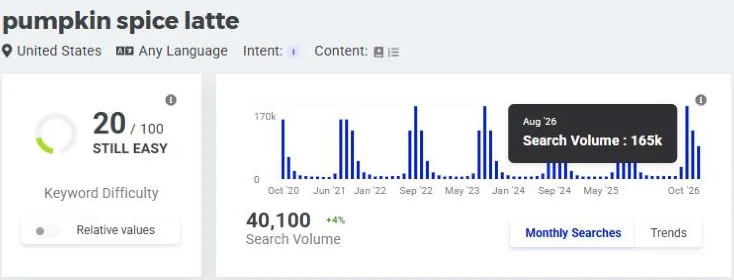
It's where the average stops telling the whole story. "Pumpkin spice latte" averages 40,100 searches a month in the US. But in August 2026, people searched for it 165,000 times, while in spring it drops to about 6,600 a month.
4. Check search volume in bulk
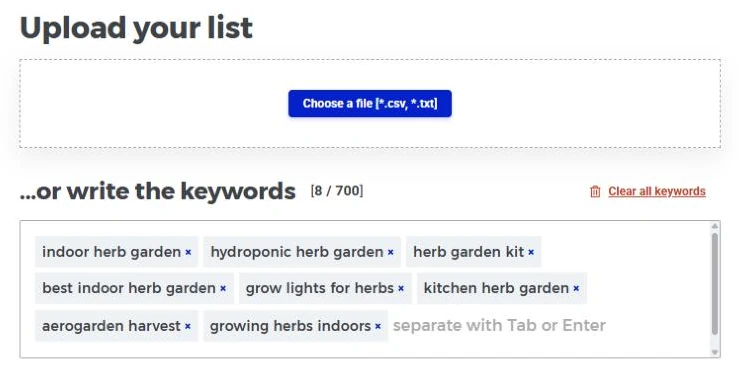
Got your own list? Select Import in the KWFinder menu, upload a .csv or .txt file (or type the keywords) and choose the location. KWFinder gets search volume, KD and other data for all of them at once, and you can export the results to CSV.
One import takes up to 200 keywords on the Basic plan, and more on Premium and Agency. Learn more about importing keywords in bulk.
5. Check the volume of your competitors' keywords
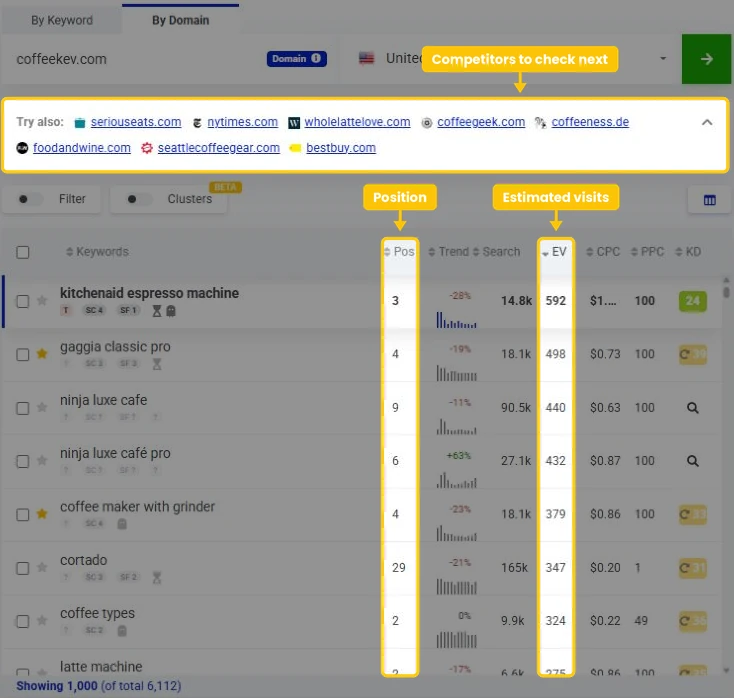
Switch to Search by Domain, enter a competitor and KWFinder lists the keywords it ranks for, with the search volume, position and estimated visits of each one. See how to find your competitors' keywords.
What is a good search volume?
There's no universal number. A good search volume is one that's worth the effort for your website. It depends on:
- Your niche - narrow niches simply have smaller numbers. 200 searches a month can be a top keyword in B2B software and a tiny long-tail keyword in fashion.
- Keyword difficulty - 1,000 searches you can rank for beat 50,000 you can't. Check the keyword difficulty next to the volume.
- Search intent and value - a keyword where people are ready to buy can bring more customers with fewer searches. A high CPC is a good hint.
- Location - local keywords have smaller volumes, but a much more relevant audience.
Tip: Look for keywords that are popular, rankable and relevant at the same time. That's the Keyword Tripod Rule. For a brand-new website, try the Keyword Golden Ratio.
Metrics to check next to search volume
Search volume tells you how many people search. These metrics tell you whether the keyword is worth it, and KWFinder shows them next to every keyword:
- Keyword difficulty (KD) - how hard it is to rank on page 1, from 0 to 100.
- Search intent - why people search: informational, navigational, commercial or transactional.
- CPC - what advertisers pay per click in Google Ads. A high CPC is a sign of commercial value.
- PPC - how strong the competition among advertisers is, from 0 to 100.
- Trend - whether interest grew or dropped over the last 12 months.
- SERP features - whether the results show an AI Overview, a featured snippet or other features that take clicks.
What search volume to target with your website
The right search volume depends on how strong your website is. The same keyword can be hard for one website and easy for another:
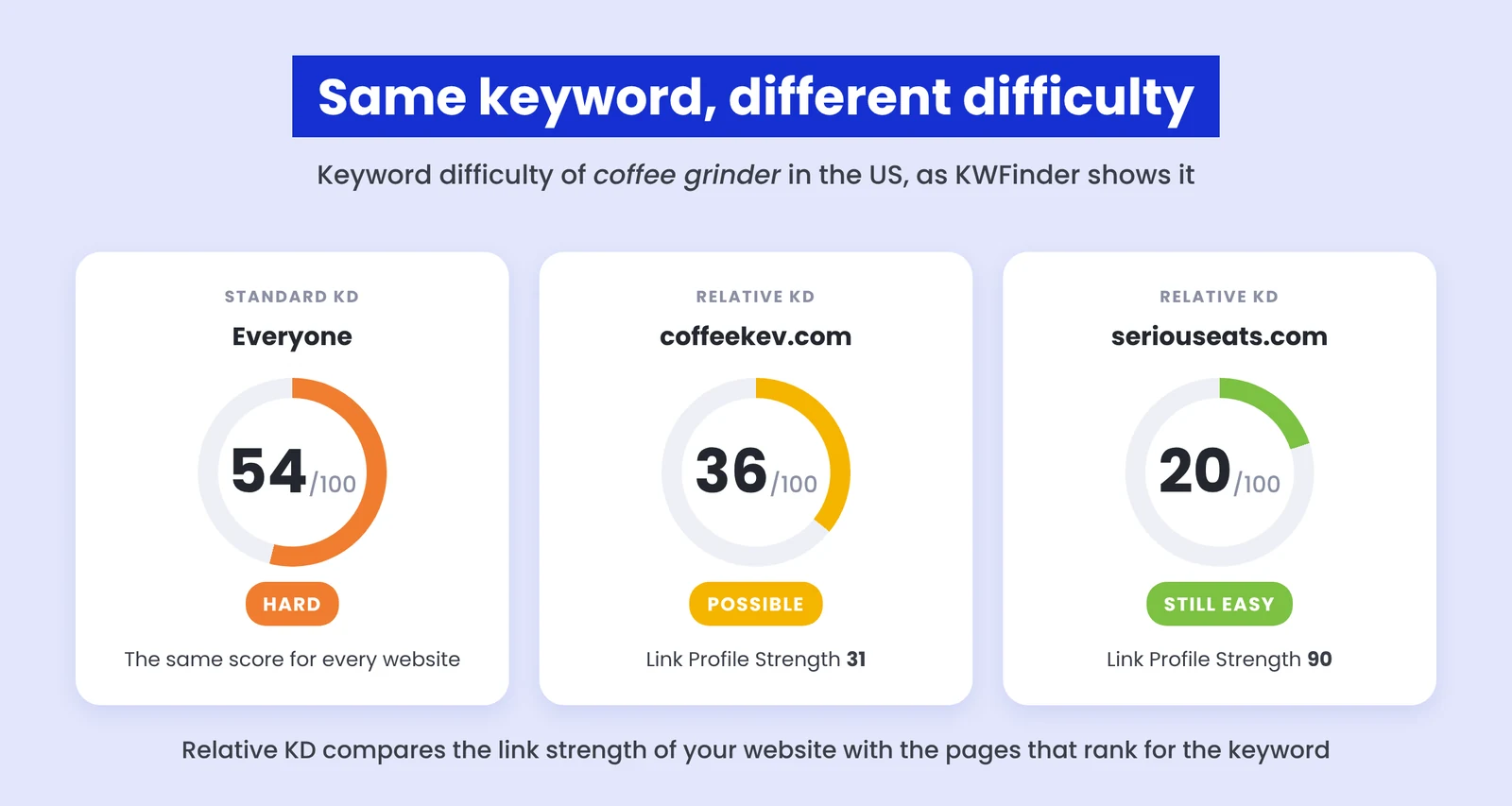
Turn on Relative values under the KD score and enter your URL. KWFinder compares the link strength of your website with the pages that rank and shows the difficulty for you. Then use this as a starting point:
| Your website | Where to start | What to set in the KWFinder filter |
|---|---|---|
| New, with few or no links | Long-tail keywords with a few hundred searches a month or less | KD up to 20, 4 or more words |
| Growing, with some links | Body keywords with a few hundred to a few thousand searches | Relative KD up to 30-40 |
| Established, with strong links | Head and body keywords with the most searches in your niche | Relative KD up to 50, sorted by search volume |
Check the relative KD again every few months. As your website gets more links, keywords that were too hard last year can be within reach today.
Head, body and long-tail keywords
Keywords are often split into 3 groups by their search volume:
| Type | Example | Search volume | Difficulty |
|---|---|---|---|
| Head | "coffee" | Very high | Very hard |
| Body | "coffee grinder" | Medium to high | Medium to hard |
| Long tail | "best manual coffee grinder for espresso" | Low | Usually easier |
The split is a rough guide. Length and volume don't always go together: some long keywords get thousands of searches, and some one-word keywords get only a few.
Don't skip low-volume keywords
Long-tail keywords have small volumes on their own, but they're specific, easier to rank for and often convert better. And one page rarely ranks for just one keyword.
A good page ranks for dozens of related long-tail keywords, so its traffic adds up to much more than any single number suggests.
Even keywords that show 0 can be worth it. Tools often can't see enough searches for very specific or brand-new keywords. Check your Google Search Console: you'll likely find impressions for keywords that every tool shows as 0.
How search volume changes over time
Search volume isn't a fixed number. These 4 things move it the most:
1. Seasons and holidays
Evergreen keywords get about the same number of searches all year. Seasonal keywords peak at the same time every year, like "pumpkin spice latte" in August and September or "christmas gifts" in November and December.
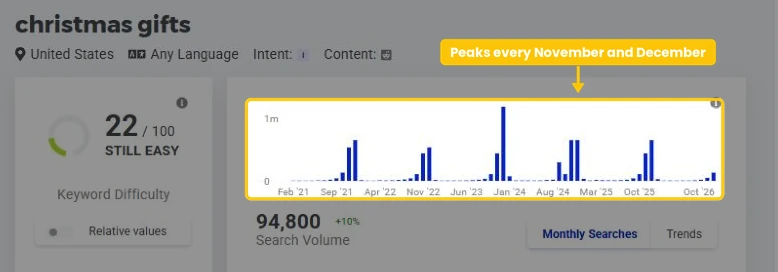
Publish or update your content 2 to 3 months before the peak, so Google has time to find and rank it.
2. Trends and news
News, product launches and viral topics can multiply the volume of a keyword overnight.
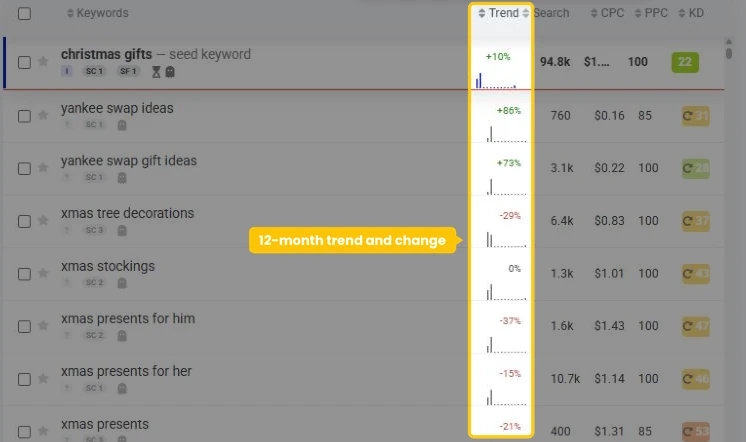
The Trend column in KWFinder shows the last 12 months, and its percentage compares the recent 3 months with the same months a year earlier, so you can see what's growing and what's fading.
3. Location and language
The same keyword can be popular in one country and almost unknown in another, or spelled differently.
Check the volume where your audience actually is. The competition changes too. For example, "coffee grinder" has a KD of 54 in the US, but just 38 in Seattle. Learn how to do local keyword research for any city or region.
4. AI search
AI Overviews and AI assistants answer many questions directly. The search volume can stay the same while the clicks drop, especially for simple questions.
KWFinder shows which keywords trigger an AI Overview in the SERP features badge (SF) under each keyword.
How to use search volume in your SEO strategy
Search volume is most useful when you combine it with other data. Here are 4 ways to put it to work.
1. Prioritize topics, not single keywords
A page ranks for a whole group of keywords, so compare the demand for topics, not for single keywords.
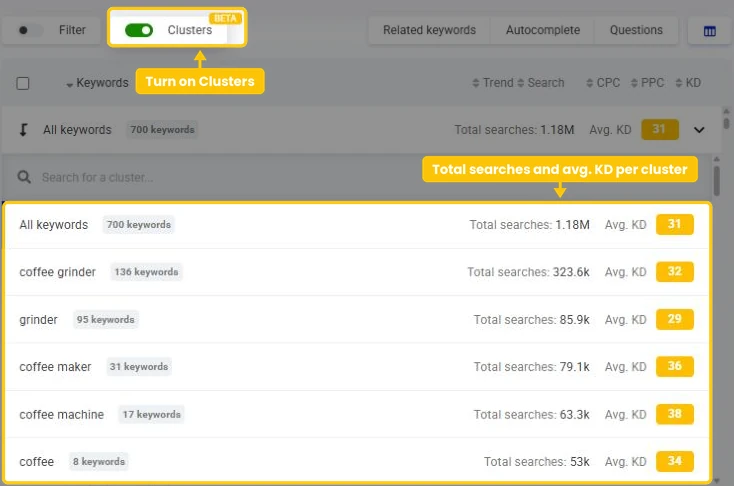
Turn on Clusters in KWFinder and every topic shows its Total searches. Learn more about keyword clustering.
2. Estimate the traffic you can get
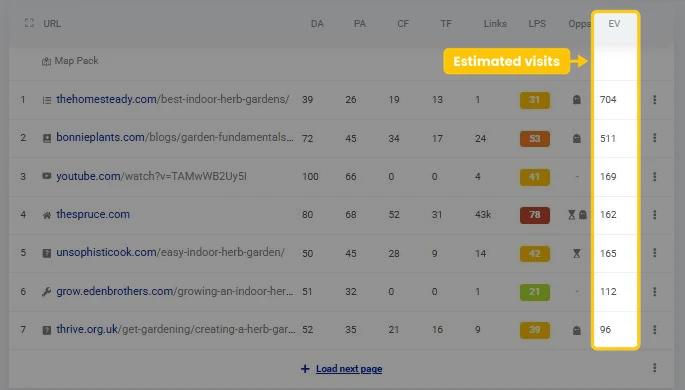
Search volume tells you the demand. Your traffic depends on where you rank. The Estimated visits (EV) column in the SERP overview shows how many visits a month each position gets from the keyword, based on its click-through rate.
3. Compare demand across markets
Planning to expand to another country? Import the same list twice, with a different location each time, and compare the volumes side by side. It's a quick way to see where your topic has the most demand.
4. Find high-volume, low-competition keywords
Set a minimum search volume and a maximum KD in the KWFinder Filter and you're left with high-volume, low-competition keywords: enough demand and a real chance to rank.
For example, try at least 500 searches a month and a KD under 30. Learn how to filter keywords in KWFinder by any metric.
Check search volume for free
Mangools gives you 3 free ways to check search volume, from a quick comparison to thousands of keywords:
- No account (Share of Search) - compare the monthly search volume of up to 5 keywords in any country with the free Share of Search tool. Without an account, it covers the last 12 months.
- Free account (KWFinder) - 5 searches a day with all the data: search volume in more than 52,000 locations including cities, the volume of every month, the trend, KD, CPC and the top 10 results. Each search shows up to 15 keyword ideas, 25 in your first 10 days. No credit card needed.
- Free account and your AI assistant (MCP welcome bonus) - connect the Mangools MCP server to Claude, ChatGPT or another assistant and get 100 keyword lookups with Premium-level results. Each one returns up to 700 keyword ideas with their search volumes, so you can check thousands of keywords for free.
Many free checkers show one country-level number and stop there. KWFinder shows the same keyword in a city, month by month, next to its difficulty.
Check search volume from your AI assistant
AI assistants are great at brainstorming keywords, but on their own they don't know how many people search for them, so any number they give you is a guess.
Connect the Mangools MCP server and your assistant gets real search volumes, trends and SERPs from KWFinder.
It works with Claude, ChatGPT, Cursor, n8n and other tools that support MCP. Then just ask:
"Get the US search volume for these 50 keywords, show me the ones with a clear seasonal peak and tell me when to publish each one."
The MCP server and the Mangools API are included in every plan, the free one too. Free accounts get a one-time welcome bonus of 100 keyword lookups and 100 SERP lookups.
What people say about Mangools search volume data
"…spot-on search volume estimates and keyword difficulty ratings"
"…results are accurate with KWFinder as it can help me compare apples to apples."
"…built for marketers who need accurate keyword difficulty scores, search volume data…"
Frequently asked questions
How often is search volume updated?
KWFinder gets the search volume of each month at the end of the following month, sometimes sooner. So the numbers for September are in KWFinder by early November at the latest. The Monthly Searches chart shows which months are already in.
Why does a keyword show 0 or N/A search volume?
There are no recorded searches for it in the period you chose. N/A often shows up under Last 3 mo. or Last 6 mo. for keywords with older data only or no searches in the recent months. Switch to Last known, which averages the 12 newest months KWFinder has, however old they are, and check the Monthly Searches chart to see which months have data.
Can I check search volume for YouTube, Amazon or Bing?
Not in KWFinder. It shows search volume for Google search. YouTube, Amazon and Bing have their own search data. For Bing, Microsoft Advertising Keyword Planner shows search volumes. For YouTube and Amazon, use tools made for each platform.
Is there search volume for AI prompts?
Not in the same way. ChatGPT, Gemini and other AI assistants don't publish how often people ask a question, so any prompt volume you see in a tool is an estimate.
The search volume of the matching Google keyword is still the best sign of demand. To see whether AI answers mention your brand, use AI Search Watcher.
Find keywords people actually search for
Check search volume, spot seasonal peaks and compare demand across countries and cities, all in one place.
Create a FREE accountNo credit card needed • 5 searches a day