Free Keyword Clustering Tool
Group hundreds of keywords into topics in seconds, see which topics are worth your time and plan one page for each of them.
 Rated 4.7/5 on G2 and 4.8/5 on Capterra
Free account • No credit card needed • 5 searches a day
- Keyword clustering (also called keyword grouping) puts keywords that one page can rank for into the same group, so you plan pages around topics, not single keywords.
- There are 2 main methods: grouping by shared words, which is fast and free, and grouping by shared Google results, which is closer to how Google sees the keywords.
- KWFinder Clusters groups your keyword list by shared words in one click and shows the total searches and average KD of every cluster.
- Before you build a page, check the SERP: If 2 keywords share 3 or more of their top 10 results, one page can usually rank for both.
What you get with Mangools keyword clustering
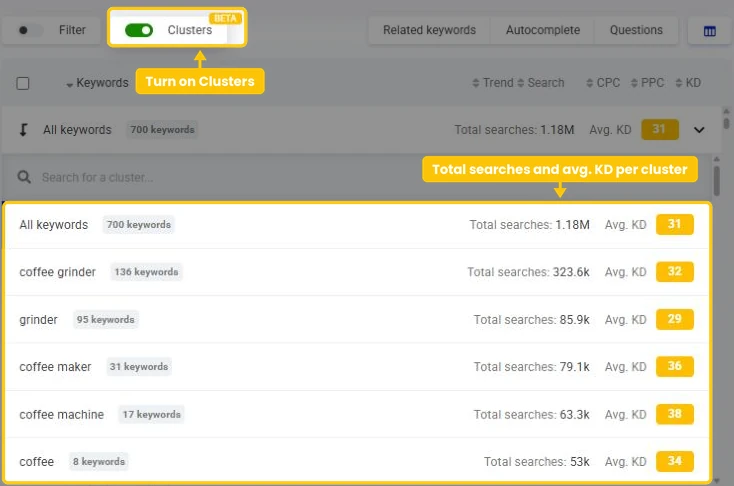
Turn on Clusters above any keyword list in KWFinder and your keywords are grouped into topics right away.
Clusters in one click
Clustering runs on the keywords already in your list, in seconds. It doesn't use any lookups.
Total searches per cluster
The sum of the monthly searches of all keywords in a cluster, so you can see which topics have the most demand.
Average KD per cluster
See at a glance which topics are easy to win and which ones will take a lot of work.
Works with all your keyword sources
Related keywords, autocomplete suggestions, questions, a competitor's keywords, your saved lists and imports.
Clusters and filters together
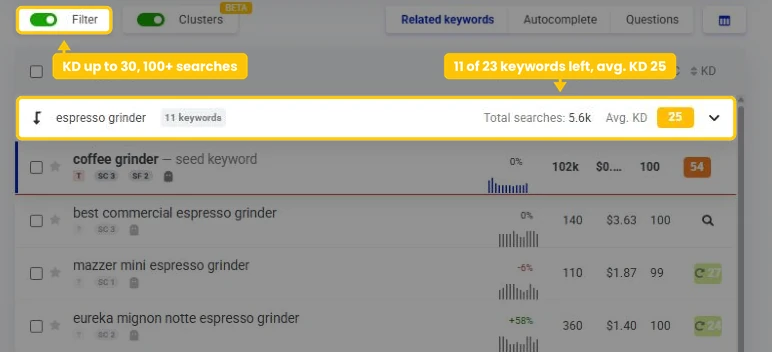
Choose a cluster and filter it, for example to keywords with a KD under 30 and at least 100 searches a month.
The SERP of every keyword
Click any keyword in a cluster to see its top 10 results and check whether it belongs on the same page.
What is keyword clustering?
Keyword clustering is the process of grouping keywords with the same search intent, usually the ones that share many of the same Google results, so you can target a whole group with one page instead of one keyword per page. You'll also hear it called keyword grouping.
Keyword clustering example
Google doesn't rank pages for one keyword. A good page about espresso grinders ranks for dozens of related keywords at once: "espresso grinder", "best espresso grinder", "single dose espresso grinder" and many more.
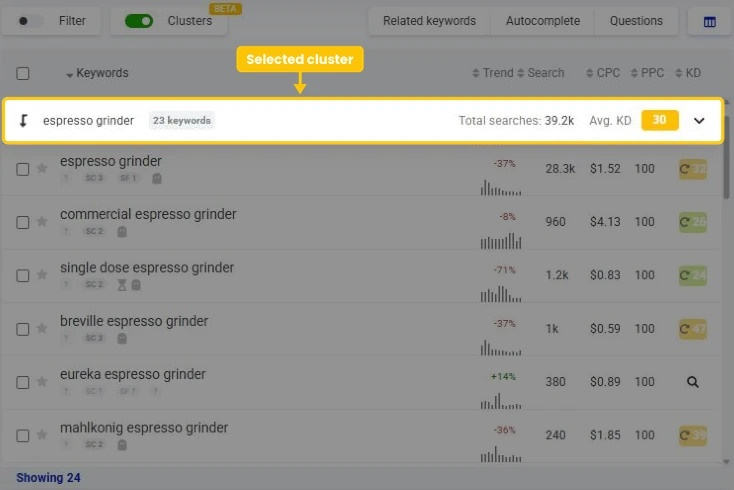
In KWFinder, the "espresso grinder" cluster for a search for "coffee grinder" has 23 keywords with 39,200 searches a month in total and an average KD of 30. That's one topic, and potentially one page.
Keyword cluster vs. topic cluster
The two terms sound alike, but they work on different levels:
| Keyword cluster | Topic cluster | |
|---|---|---|
| Level | One page | A whole section of a website |
| What it groups | Keywords with the same search intent | A main (pillar) page and the pages around it |
| Goal | One page ranks for many keywords | Show Google that you cover a topic in depth |
Keyword clusters are the building blocks of topic clusters. First you find out which keywords belong on one page, then you connect the related pages with internal links.
Why keyword clustering matters
Clustering turns a long list of keywords into a plan you can actually work with:
- One page, many keywords - you build one strong page for a group of keywords instead of a thin page for each.
- No competing pages - each topic gets one page, so your pages don't compete with each other. That's called keyword cannibalization.
- Better answers for readers - one page that covers a whole topic answers more of their questions, so they don't have to keep searching.
- Better priorities - total searches and average KD show which topics are worth your time first.
- Faster planning - a list of 700 keywords becomes a few dozen topics you can plan in an afternoon.
Keyword clustering methods
There are 3 main ways to cluster keywords. Each one is good for something else:
| Method | How it groups keywords | Best for | Watch out for |
|---|---|---|---|
| By shared words | Keywords that share a word or a phrase, like "espresso grinder" | A fast first pass over big lists and finding topics | Keywords with different words but the same intent end up in different clusters |
| By shared Google results (SERP-based) | Keywords whose top 10 results share enough URLs, usually 3 or more | Deciding which keywords go on one page | Needs the SERP of every keyword, so it's slower and costs more on big lists |
| By meaning (semantic or AI) | Keywords with a similar meaning, grouped by language models | Quick topic ideas and cluster names | Doesn't know what Google ranks, and AI tools can skip or invent keywords |
KWFinder Clusters uses the first method: it's instant, free and works on any list. For page planning, check your clusters against the SERP, the second method.
Semantic tools turn each keyword into a list of numbers that describes its meaning, called an embedding, and group the keywords whose numbers are close. It's fast and works in many languages, but it can't tell you whether Google ranks the same pages for them.
Soft, moderate and hard SERP clustering
SERP-based clustering comes in 3 flavors:
- Soft clustering - each keyword is compared only with the main keyword of the group. You get fewer, bigger clusters, good for planning a whole section of a website.
- Moderate clustering - every keyword shares URLs with at least one other keyword in the group, but not necessarily with all of them. It's a middle ground between soft and hard.
- Hard clustering - every keyword in a group has to share URLs with every other keyword. You get more, smaller clusters, good for deciding what goes on one page.
The more shared URLs you require, the smaller and stricter your clusters get.
Some tools also let you choose the algorithm. Centroid clustering builds each group around one central keyword, much like soft clustering.
Agglomerative (or hierarchical) clustering starts with every keyword on its own and keeps merging the most similar groups until they no longer share enough URLs.
How to cluster keywords manually
With a small list, a spreadsheet is enough:
- Export your keywords with their search volumes to a spreadsheet.
- Sort them alphabetically and group the ones that share a main word or phrase.
- For each group, google the main keyword and 2 or 3 others. Move any keyword whose results look different to a group of its own.
- Give each group a name and pick its main keyword.
This works for a few dozen keywords. With hundreds, it takes hours, which is why most people let a tool do the first pass.
How to cluster keywords in KWFinder
Here's how to go from a seed keyword to clusters you can turn into pages:
1. Build your keyword list
Search for a seed keyword, use Autocomplete and Questions for more ideas, search a competitor by domain or import your own list.
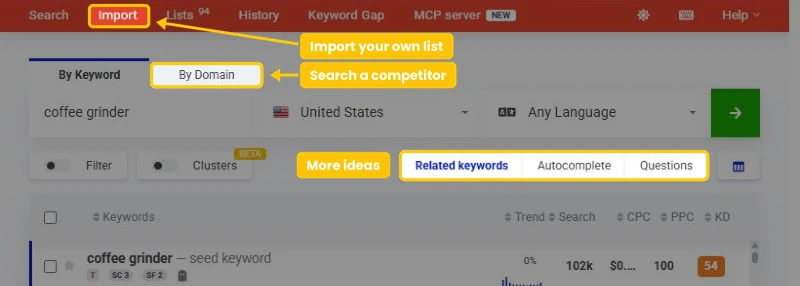
More keywords give you better clusters: a search shows up to 200 keyword ideas on Basic, and more on Premium and Agency.
2. Turn on Clusters
Turn on the Clusters switch next to Filter, above the keyword list. It needs at least 3 keywords in the list.

3. Pick a cluster
Open the row above the table, which starts as All keywords. Every cluster shows its number of keywords, Total searches and Avg. KD, with the biggest ones first.
Type in Search for a cluster to find a specific topic. Select a cluster and the table shows only its keywords.
4. Narrow it down with the filter
The cluster and the Filter work together. Set a maximum KD or a minimum search volume and you'll see only the keywords in the cluster that are worth targeting. Learn how to filter keywords in KWFinder by KD, search volume and more.
5. Save each cluster
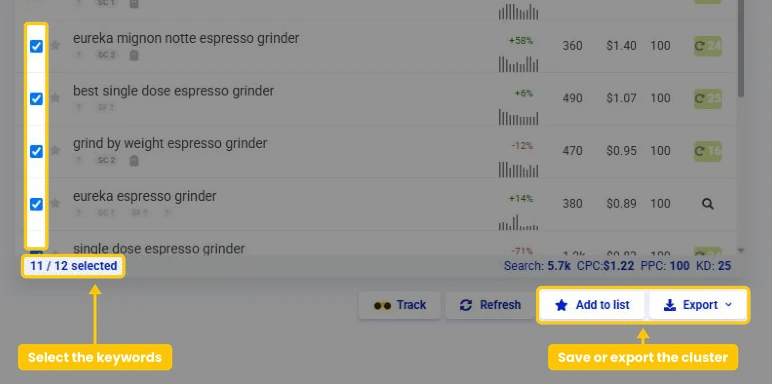
Select the keywords of a cluster and add them to a keyword list, one list per page you plan. Or export them to CSV and work on them in a spreadsheet.
How KWFinder builds the clusters
KWFinder groups the keywords by simple, transparent rules:
- A cluster is a word or a phrase of up to 3 words that at least 3 keywords share.
- Longer phrases come first, and each keyword joins one cluster only.
- Common words like "the" or "for" don't count, and neither do words shorter than 3 letters.
- Keywords that share nothing with others stay under All keywords.
Note: Total searches adds up the monthly searches of all keywords in a cluster. Some close variants share one search volume, so the same searches can be counted more than once. Use it to compare topics, not as an exact number.
Tip: Clusters match words exactly, so accents, plurals and spellings count as different words.
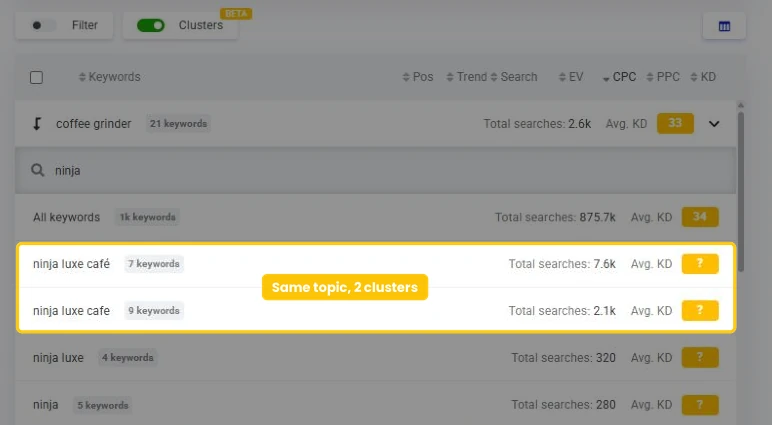
For coffeekev.com, KWFinder shows "ninja luxe café" (7 keywords) and "ninja luxe cafe" (9 keywords) as 2 clusters, and the same happens with "espresso machine" and "espresso machines". Look for such pairs and plan them as one page.
How to utilize KWFinder Clusters in your SEO strategy
Clusters works on every keyword list in KWFinder, not only on keyword ideas. That makes it useful for much more than planning new pages:
a) See a competitor's topics
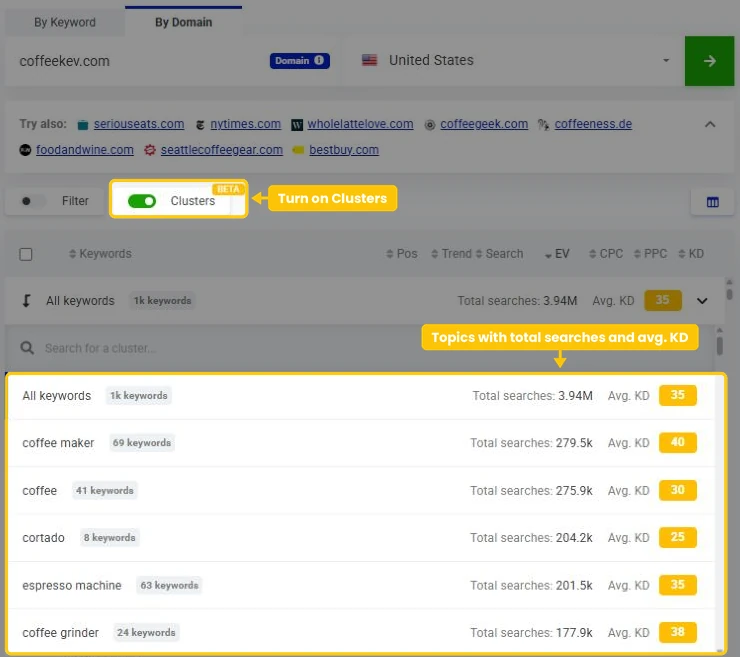
Search a competitor by domain and turn on Clusters. Their keywords fall into topics, each with its total searches and average KD.
For coffeekev.com, the biggest ones are "coffee maker" (69 keywords, 279,500 searches a month), "coffee" (41 keywords, 275,900) and "espresso machine" (63 keywords, 201,500). Compare them with your own pages and you get a list of topics you're missing.
b) Cluster your Search Console queries
Export the queries from the Performance report in Google Search Console and import them into KWFinder.
Turn on Clusters and you see which topics you already get impressions for, with the search volume and KD of every query.
A topic with many queries but no page of its own is usually your fastest win. One import takes up to 200 keywords on Basic, and more on Premium and Agency.
c) Group questions for an FAQ
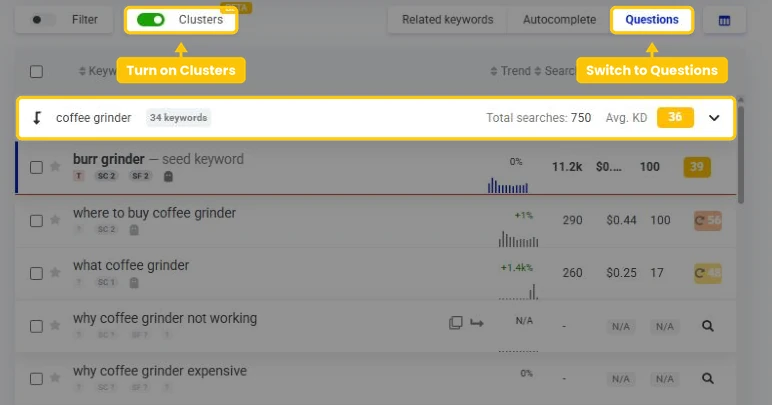
Switch to Questions and turn on Clusters. Questions about the same subject end up together, ready to become an FAQ section or a set of short guides.
Check the SERP overlap
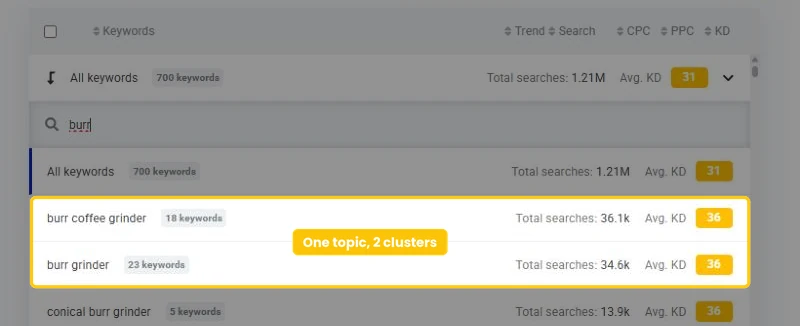
Clusters by shared words are a great first pass, but they can't see what Google ranks. In the "coffee grinder" example, KWFinder puts "burr grinder" and "burr coffee grinder" into 2 separate clusters, although one page could probably rank for both.
And the "espresso grinder" cluster includes "commercial espresso grinder", which may need its own page for café owners.
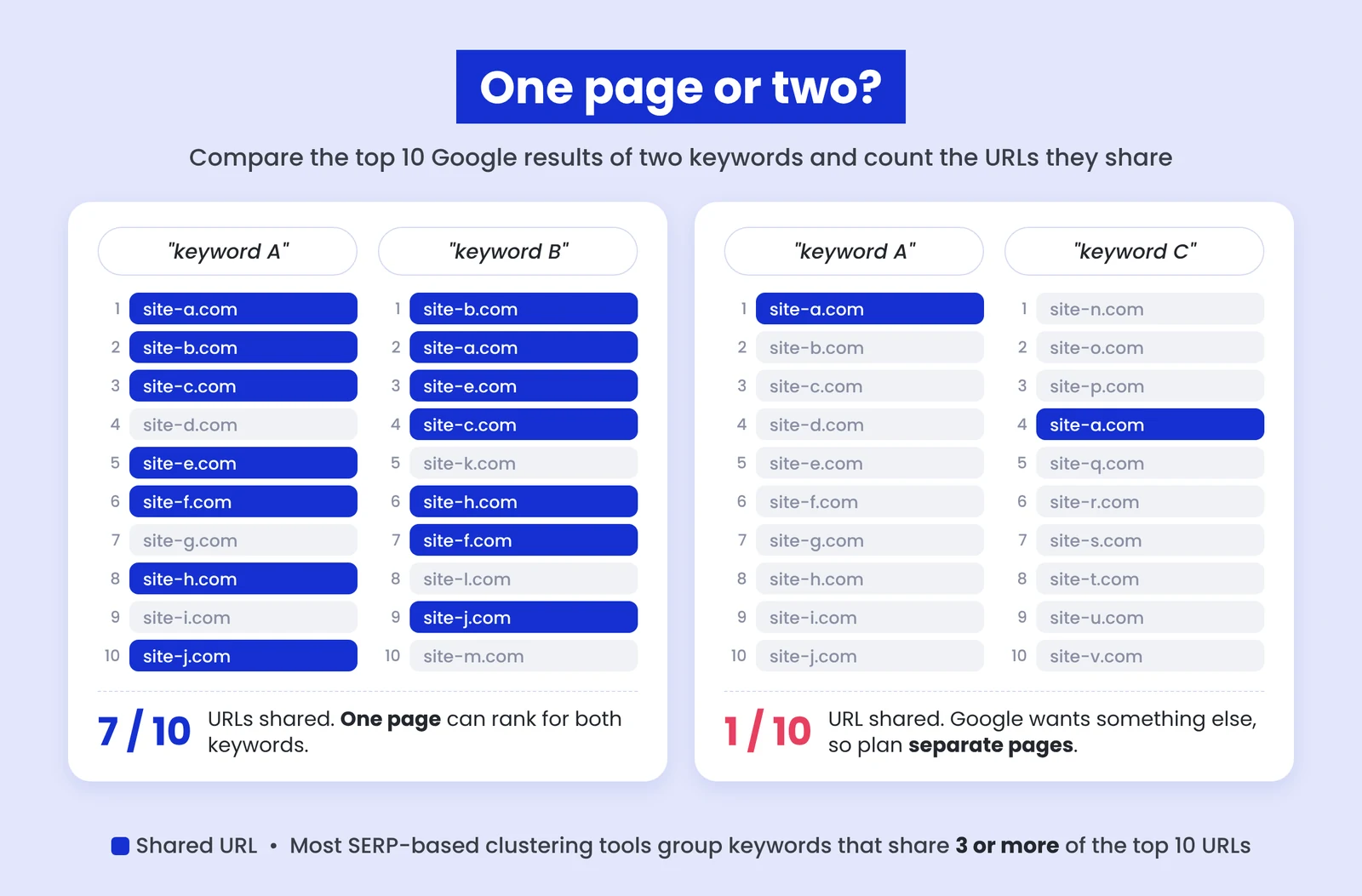
The SERP shows you which keywords belong together. If 2 keywords share 3 or more of their top 10 results, Google sees them as the same topic and one page can usually rank for both.
If they share 1 or none, plan separate pages. For anything in between, check the search intent and the type of pages that rank.
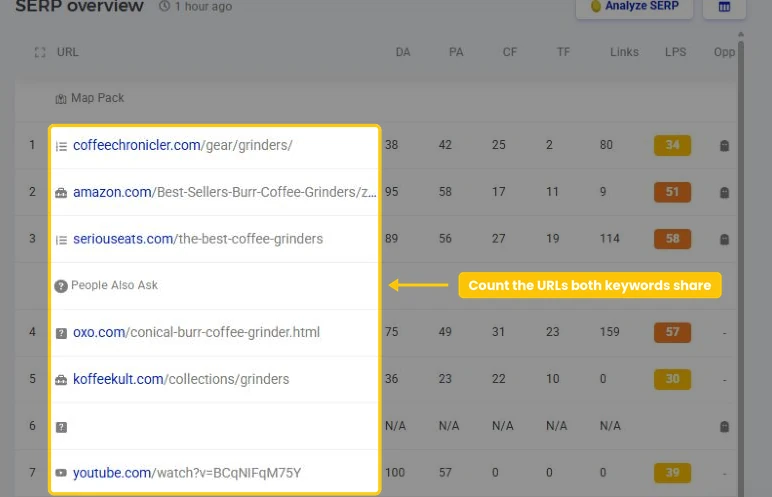
How to check it in KWFinder:
- Click the first keyword and look at its SERP overview on the right.
- Click the second keyword and compare its results.
- Count the URLs that rank in both top 10s.
Tip: For a deeper look at a SERP, open the keyword in SERPChecker. You can switch between desktop and mobile results, choose the metrics you see for every result and compare your own page with the pages that rank.
Here's what the SERPs show for the 2 pairs from our "coffee grinder" example, checked in SERPChecker for the US:
| Keywords | Shared results in the top 10 | One page or two? |
|---|---|---|
| "burr grinder" and "burr coffee grinder" | 6: the same guides from Coffee Chronicler and Serious Eats, the OXO product page, Amazon's best sellers, the Fellow grinder page and one Reddit thread | One page |
| "espresso grinder" and "commercial espresso grinder" | 1: a shop's page with commercial grinders. The rest are pages for cafés from grinder brands and coffee equipment shops, and a thread on r/barista | Two pages |
KWFinder's clusters split the first pair because the words differ, but Google treats it as one topic.
The second pair shares the words "espresso grinder", but Google shows different pages for it, because café owners shop for different grinders than home baristas.
What to do with keywords in between
Some keyword pairs share just 2 of their top 10 results, right between one page and two. Before you decide, look at 3 more things:
- Search intent and page types - if one keyword shows product pages and the other one shows guides, they need separate pages, whatever the overlap.
- How strong the ranking pages are - open the SERP overview of both keywords and compare the LPS (Link Profile Strength) of the pages that rank. If the pages for the second keyword are clearly weaker, a page of its own can be the easier win.
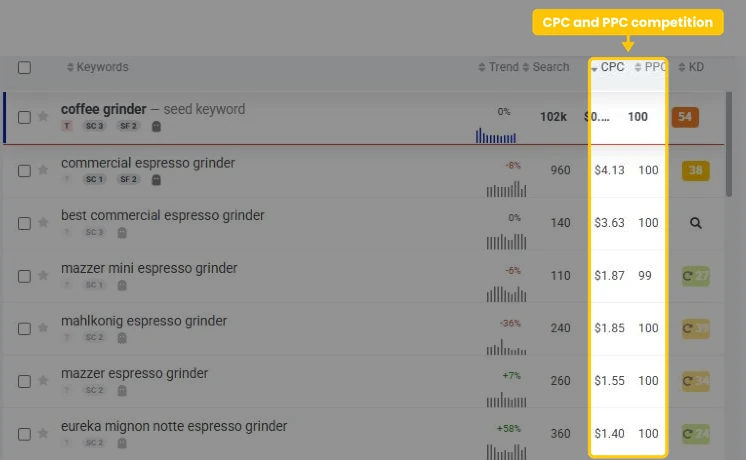
- What advertisers pay - a big difference in CPC often means a different audience. In KWFinder, "commercial espresso grinder" has a CPC of $4.13 and "espresso grinder" $1.52. The first one is most likely searched by cafés buying professional equipment, so it deserves its own page.
Still not sure? Start with one page. Once it ranks, check Google Search Console. If the page also gets impressions and clicks for the second keyword, keep one page. If it doesn't, give that keyword a page of its own.
From clusters to pages
Once you know which keywords belong together, turn each cluster into one page. This step is also called keyword mapping.
1. Pick the main keyword
Choose the keyword that best describes the whole cluster, usually the one with the most searches.
Use it in the title tag, the meta description, the H1, the URL and the first paragraph of the page.
2. Cover the rest of the cluster
Use the other keywords in subheadings, in the text and in image alt texts, where they fit naturally.
One mention of a close variant is enough, so don't force every version in. Together, the keywords show you which questions and subtopics the page should answer.
Here's what the keywords around "espresso grinder" tell you in KWFinder:
| What people add | Keywords | Searches a month | What the page should cover |
|---|---|---|---|
| A budget | "best budget espresso grinder", "best espresso grinder under 500" | 1,100 and 320 | Picks for different budgets |
| How they grind | "single dose espresso grinder", "manual espresso grinder", "grind by weight espresso grinder" | 1,200, 810 and 460 | The types of grinders and who each one is for |
| A brand | "breville espresso grinder", "baratza espresso grinder", "eureka espresso grinder" | 1,000, 640 and 380 | The brands people compare |
| Where they use it | "home espresso grinder" and "commercial espresso grinder" | 1,000 and 960 | Grinders for home. Commercial grinders need a page of their own |
Together, these keywords give you the outline of the page: what to compare, which types to explain and which brands to include.
3. Check your existing pages
Before you write a new page, check whether you already have one on the topic. Updating it is faster than starting from scratch, and you avoid two pages competing for the same keywords.
4. Link related clusters
Connect pages about related clusters with internal links, and link them to a main page on the topic. That's how keyword clusters grow into topic clusters.
5. Start with the right clusters
Prioritize clusters with high total searches, a low average KD and a clear value for your business. Check the KD of the main keyword too, because a low average can hide one hard keyword.
Turn on Relative values under the KD score to see how hard each keyword is for your own website. Find out how keyword difficulty works and which KD fits your website.
6. Track each cluster
Add the keywords of each cluster to SERPWatcher and give them one tag per cluster, so you see how the whole topic ranks, not just one keyword.
In Google Search Console, filter the Performance report by the page's URL to see every query it gets impressions for. New queries there often belong to the same cluster.
Keyword grouping for Google Ads
Keyword clusters work for paid search too. In Google Ads, each cluster can become one ad group:
- One theme per ad group - the keywords in a cluster share the same intent, so one set of ads fits all of them.
- Ads that match the search - use the cluster's main keyword in the ad headlines.
- One landing page per cluster - send the clicks to the page that answers that exact topic.
In KWFinder, check the CPC and PPC columns of each cluster's keywords to see what the clicks cost and how many advertisers compete for them.
Cluster keywords with your AI assistant
AI assistants are good at grouping keywords by meaning. But on their own, they don't see search volumes or Google results, and with long lists they can skip or invent keywords.
You can connect the Mangools MCP server and your assistant gets real keywords, search volumes, KD and live SERPs from KWFinder and SERPChecker.
That makes SERP-based clustering easy. It works with Claude, ChatGPT, Cursor, n8n and other tools that support MCP. Just ask:
"Find 100 keywords about espresso grinders in the US, get the top 10 Google results for each one from SERPChecker and group the keywords that share at least 3 URLs. Show the total searches and average KD of every group."
Each SERP your assistant checks uses one SERP lookup. The MCP server and the Mangools API are included in every plan, the free one too. Free accounts get a one-time welcome bonus of 100 keyword lookups and 100 SERP lookups.
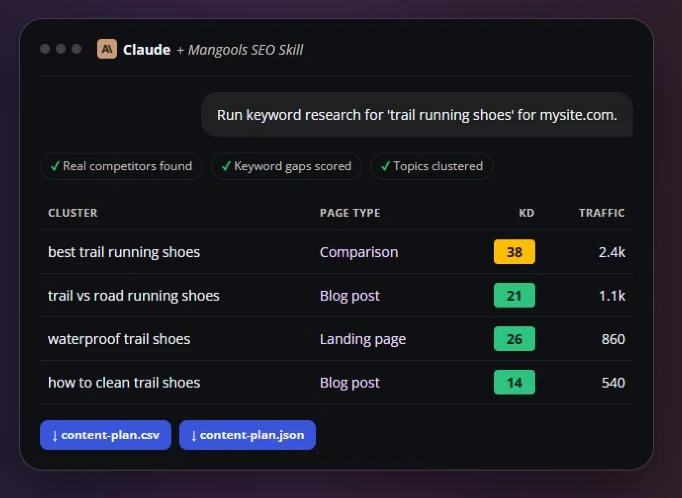
Using Claude? Add the free Mangools SEO skill. Give it a seed keyword and your domain, and it groups the keywords into topic clusters on live KWFinder and SERPChecker data and suggests a page type for each one. You get a content plan, ready to download as CSV or JSON.
Frequently asked questions
Is keyword clustering in KWFinder free?
Yes. The Clusters feature works in every Mangools account, the free one too. The free plan shows 15 keyword ideas per search, though (25 in your first 10 days), so you get bigger and more useful clusters on a paid plan.
How many keywords should one cluster have?
There's no fixed number. A cluster should hold all the keywords one page can rank for, whether that's 3 or 50. If a cluster gets very big and covers several questions, it's often a sign to split it into a main page and a few supporting pages.
How often should I cluster my keywords again?
Whenever you add a lot of new keywords, and at least once or twice a year for your main topics. Google's results change over time, so keywords that shared a page a year ago may need separate pages today, and the other way around.
Does keyword clustering help with AI search?
It can. AI answers like Google's AI Overviews often draw on several pages to cover a question and its follow-up questions. A page built around a whole cluster answers more of those related questions in one place, which gives AI answers more reasons to use it. To see whether AI answers mention your brand, try AI Search Watcher.
Turn your keyword list into a content plan
Find keywords, group them into topics and see which ones are worth your time, all in one place.
Create a FREE accountNo credit card needed • 5 searches a day