Free Keyword Difficulty Checker
See how hard it is to get on the first page of Google for any keyword, in any country or city, and how hard it is for your own website.
 Rated 4.7/5 on G2 and 4.8/5 on Capterra
Free account • No credit card needed • 5 KD checks a day
- Keyword difficulty (KD) estimates how hard it is to get a page onto the first page of Google for a keyword, on a scale from 0 to 100.
- KD comes from SEO tools like KWFinder, not from Google: Every tool calculates it differently, so compare KD values within one tool.
- Mangools KD shows how hard it is to get onto page 1, not to rank #1: To get there, you only need to beat the weakest page on page 1, so KD gives the weakest pages the most weight.
- The right KD depends on your website: Turn on Relative KD and KWFinder adjusts the score to your own link profile.
What you get with the Mangools keyword difficulty checker
Type in a keyword and KWFinder shows you its keyword difficulty together with everything you need to decide whether it's worth going after.
KD score from 0 to 100
Every keyword gets a score with a label from "easy" to "don't do it", so you know at first sight where you stand. Each KD shows its date too, and values older than 30 days fade out.
Relative KD for your website
The same score adjusted to the link profile of your own website or page, so you see how hard the keyword is for you.
Link metrics of page 1
Domain Authority, Page Authority, Citation Flow, Trust Flow, backlinks and Link Profile Strength (LPS) of every page that ranks on page 1.
SERP features and content types
See if the keyword triggers an AI Overview, People Also Ask or a Map Pack, and what kind of pages rank: blog posts, product pages, videos or forums.
Keyword opportunities and estimated visits
Weak spots of the top pages you can use to outrank them, such as outdated content or missing keywords in titles. Plus the visits each position gets every month.
Search volume, CPC and search intent
The search volume and its trend, CPC, PPC competition and the intent behind every keyword, right next to its KD.
What is keyword difficulty (KD)?
Keyword difficulty (KD) is an SEO metric that estimates how hard it is to get a page onto the first page of Google (the top 10 organic results) for a keyword. In Mangools KWFinder, it's a score from 0 to 100 based on the link profile strength of the pages that rank there right now. The higher the score, the more authority your page needs to get in.
In SEO, "KD" is simply the short name for keyword difficulty. You may also see it called SEO difficulty, keyword competition or ranking difficulty.
KD helps you answer one practical question before you write a single word: "Can my website realistically rank for this keyword?"
Note: Keyword difficulty is not a Google metric. Google doesn't publish any difficulty score, so each SEO tool calculates its own from its own data. That's why the same keyword can have a different KD in different tools.
Keyword difficulty scale: what the numbers mean
KWFinder splits keyword difficulty into 6 ranges. Each has its own label and color, so you can scan a list of hundreds of keywords and spot the easy ones in seconds:
| KD | Label | What it means | Good for |
|---|---|---|---|
| 0-14 | Easy | Page 1 is within reach with a relevant, well-optimized page, often without any backlinks. | Any website, including brand-new ones |
| 15-29 | Still easy | Quality content and a few good backlinks usually do the job. | New and small websites |
| 30-49 | Possible | You'll need high-quality content and a decent link profile. | Websites with some authority |
| 50-69 | Hard | Plan for a long-term effort: excellent content plus a link-building campaign. | Established websites |
| 70-84 | Very hard | Page 1 belongs to strong domains with big link profiles. | Authority websites |
| 85-100 | Don't do it | The SERP is dominated by the biggest brands. Go for long-tail variations instead. | Rarely worth it |
Tip: The "Good for" column is a rule of thumb. For a number that reflects your own website, use Relative KD.
What is a good keyword difficulty score?
A good keyword difficulty score is one your website can realistically beat. For a new website, that usually means KD under 30. Websites with some backlinks can go after keywords between 30 and 49, and established websites can compete for KD 50 and more.
That's the rule of thumb. The honest answer is "it depends on your website", and that's exactly what Relative KD in KWFinder answers for you.
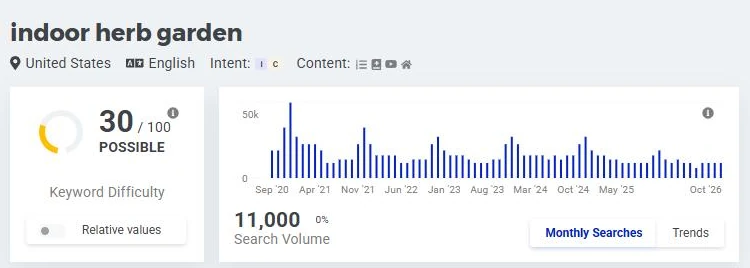
For example, the keyword "indoor herb garden" has a KD of 30 (possible). But when you check it against a page with a Link Profile Strength of 46, the relative KD drops to 5 (easy). Same keyword, same SERP, but a very different chance to rank.
Besides your link profile, a few other things decide whether a keyword is "good" for you:
- Search volume - an easy keyword with no searches won't bring you any traffic.
- Search intent - your page has to match what people want to see.
- Topical relevance - a website that covers the topic in depth often ranks above stronger, more general websites.
Tip: Keep all three in mind at once. Our Keyword Tripod Rule shows how to pick keywords that are popular, rankable and relevant at the same time.
How is keyword difficulty calculated?
Mangools calculates keyword difficulty from the link profile strength of the pages that rank on the first page of Google for the keyword, in the location you choose. It works in 3 steps:
- KWFinder loads the current SERP for your keyword and location.
- It calculates the Link Profile Strength (LPS) of every URL on page 1: LPS combines four link metrics: Domain Authority and Page Authority by Moz, and Citation Flow and Trust Flow by Majestic.
- It turns the LPS values into one KD score from 0 to 100, and it gives the most weight to the weakest pages on page 1.
Why the weakest pages? Because keyword difficulty answers the question "How hard is it to get onto page 1?", not "How hard is it to rank #1?". To get onto page 1, you don't need to beat the strongest website in the SERP. You need to beat the weakest one.
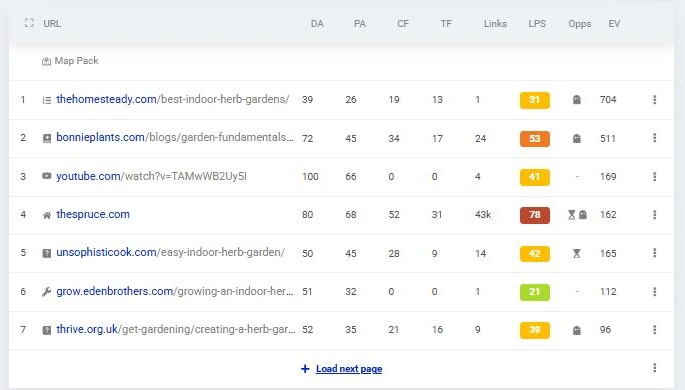
Here's how it looks for "indoor herb garden" in the US:
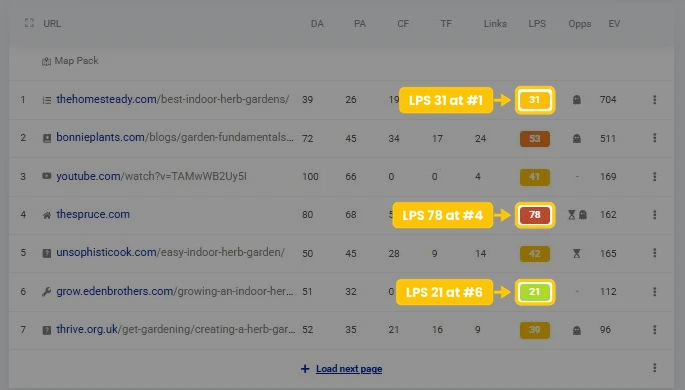
- The first result is a page with an LPS of just 31.
- A page with an LPS of 21 ranks at position 6.
- A big brand with an LPS of 78 sits at position 4.
The keyword ends up with KD 30 (possible). The strong brand on page 1 doesn't make the keyword hard on its own. The weaker pages show there's room for you.
This is also why a low-authority website can outrank big websites: relevance and content quality matter, not only links.
What affects keyword difficulty?
Keyword difficulty depends mostly on how strong the pages on page 1 are. But a few more things decide how hard a keyword really is:
- Backlinks of the ranking pages - the more quality links the pages on page 1 have, the harder they are to beat.
- Authority of the ranking websites - big brands, Wikipedia or major publishers on page 1 make any keyword harder.
- Search intent - if your page doesn't match what people want to see, it won't rank, whatever the KD. Mixed intent (does "apple" mean the fruit or the brand?) makes it harder to know what to create.
- SERP features - an AI Overview, People Also Ask, a Map Pack or ads push the organic results down and take clicks away from them.
- Brand names - for a keyword like "aerogarden", Google prefers the brand's own website, so everyone else competes for what's left.
- Keyword length - longer, more specific keywords usually have less competition than broad ones.
- Search volume and seasonality - popular keywords attract more websites that want to rank for them, and seasonal keywords can get more crowded around their peak.
- Content quality and topical authority - a website that covers the topic in depth can outrank stronger but more general websites.
Mangools KD measures the first two: the link strength of the pages on page 1. The rest you'll see in the SERP itself, and KWFinder shows the search intent, SERP features and content types next to every keyword.
How fresh is the KD?
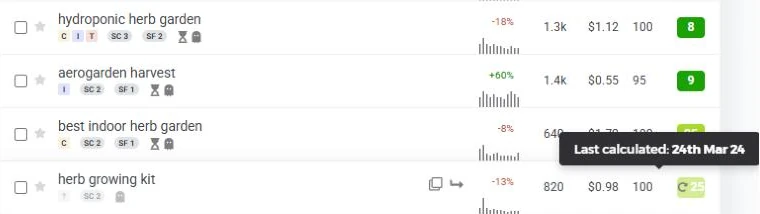
KWFinder calculates keyword difficulty from the live Google results. Every KD shows when it was last calculated:
- A KD in full color is up to 30 days old.
- A faded KD is older than 30 days. Click the keyword (or use Refresh for a whole selection) to get a new one.
- Want today's numbers? Hover over the date next to the SERP overview and select Fetch new SERP. It doesn't use any extra lookup.
Note: Keyword difficulty is calculated from links, so it can't see everything Google sees. Always check the SERP itself before you commit to a keyword.
Relative keyword difficulty: KD for your own website
The same keyword isn't equally hard for everyone. A KD of 35 might be a walk in the park for an established website, but a long shot for a blog you launched last month.
Relative keyword difficulty re-evaluates the KD according to the link strength of your own website or page. You get two numbers side by side: the usual KD that applies to everyone, and the KD that applies to you.
How to set it up:
- Under the KD gauge, select Relative values.
- Type your domain or a specific URL and select Set URL.
- KWFinder shows the adjusted KD in the gauge and in the whole keyword list. The usual KD stays visible next to it.
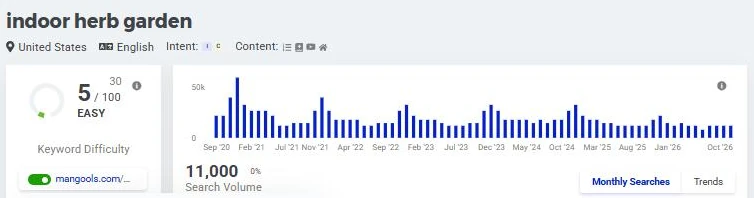
Relative KD also works with the filter. If you set a maximum KD, KWFinder filters by your relative KD, so you only see the keywords your website can realistically go after.
Tip: Planning a brand-new page? Check your domain first to see the big picture. A new URL starts with no links of its own, so internal links from your strongest pages help it catch up faster.
How to check keyword difficulty in 3 steps
Checking keyword difficulty in KWFinder takes a few seconds:
1. Enter your keyword, location and language
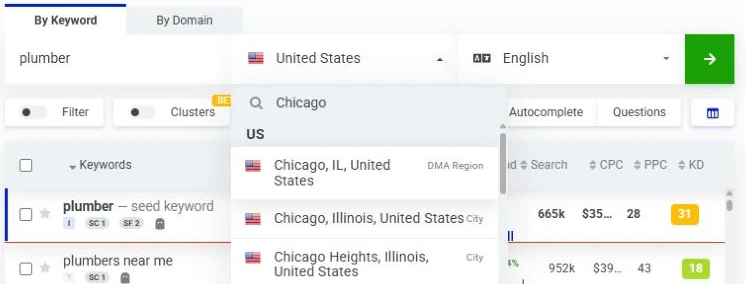
Type a keyword into KWFinder, then choose where your audience is. You can pick from more than 52,000 locations (countries, regions, cities and even neighborhoods) and 43 languages. Keyword difficulty for "plumber" in Chicago is a very different story than in the whole US, so it pays to be specific.
2. Click any keyword to see its KD
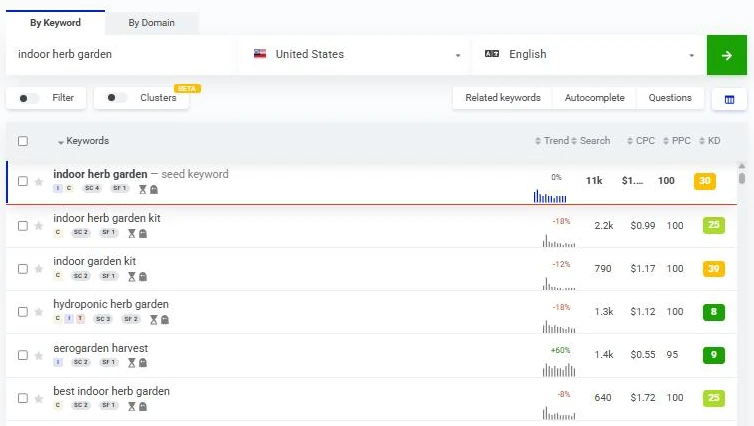
KWFinder shows the KD of your keyword right away, together with hundreds of related keywords. Click any of them and you'll see its KD, its SERP and all the metrics on the right side.
3. Check keyword difficulty in bulk
Got a list of keywords already? You have 2 options:
- Import - upload a .csv or .txt file (or paste your keywords) and KWFinder gets search volume and other metrics for all of them, plus the KD wherever it's already calculated. One import takes up to 200 keywords on the Basic plan, and more on Premium and Agency. Learn more about importing keywords in bulk.
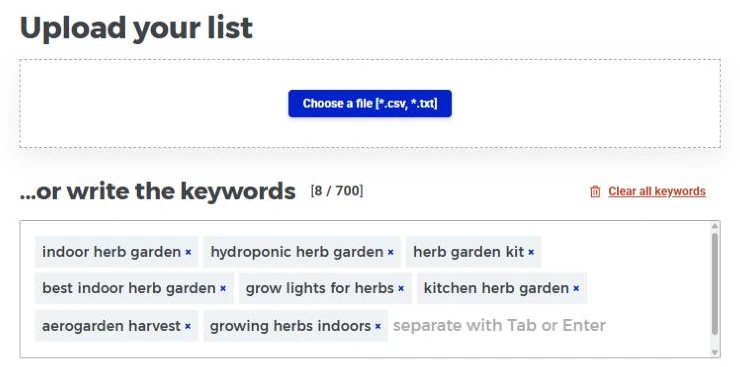
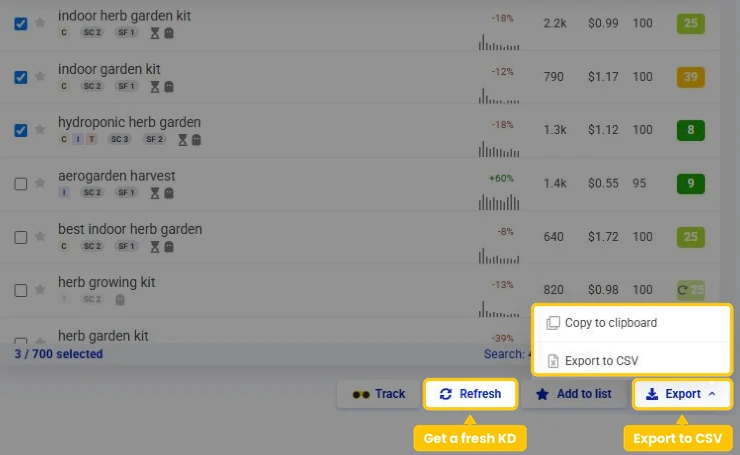
- Refresh - select the keywords in your list and select Refresh at the bottom. KWFinder calculates a fresh KD, search intent and keyword opportunities for all of them at once, also right after an import.
When you're done, select the keywords you want to keep and choose Export → Export to CSV. You can open the file in Excel or Google Sheets.
Tip: You can also check KD for the keywords your competitors rank for. Switch to Search by Domain, enter any website, and KWFinder lists its keywords together with their difficulty. See how to find your competitors' keywords.
How to use keyword difficulty in your SEO strategy
Keyword difficulty is most useful when you use it to make decisions, not just to look at a number. Here are 6 ways to put it to work.
1. Pick keywords you can win now
Start with keywords where your website has a real chance: a KD (or relative KD) your link profile can beat, enough search volume to be worth the effort, and a search intent your page can satisfy.
Quick wins build traffic, links and authority, which makes the harder keywords easier later.
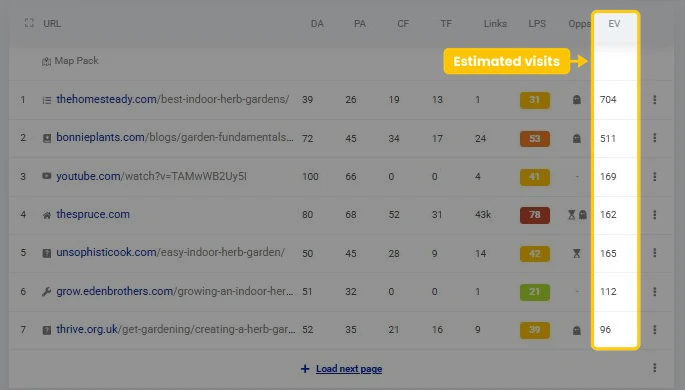
Before you commit, check what page 1 is actually worth. The Estimated visits (EV) column in the SERP overview shows how many visits per month each position gets from the keyword. If even the top positions get only a handful, an easy KD won't help you much.
2. Think about the big picture
Don't judge every keyword in isolation. A broad head keyword may be out of reach today, but you can cover the topic with easier long-tail keywords first.
As your website gains authority on the topic, the harder keywords come within reach. Our keyword research guide shows the whole process.
3. Compare topics, not only keywords
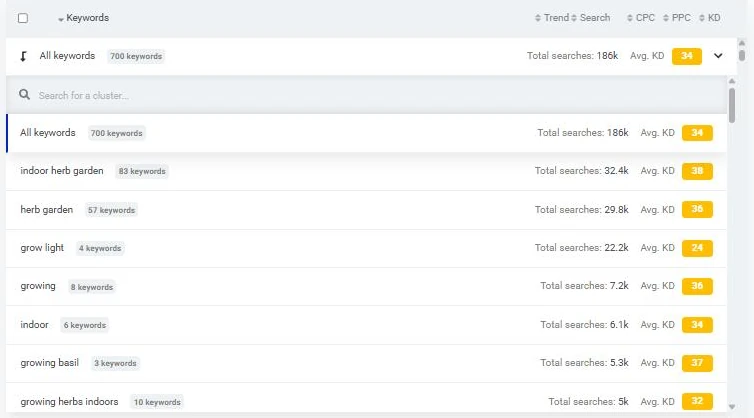
Turn on Clusters in KWFinder and your keyword list gets grouped into topics. Each cluster shows its total searches and average KD, so you can see which topics are easy to win and which ones will take a lot of work.
For "indoor herb garden", the "grow light" cluster has an average KD of 24, while the main "indoor herb garden" cluster sits at 38.
4. Decide between SEO and paid ads
If a keyword is very hard to rank for but you need traffic from it now, organic search may not be the best channel for it.
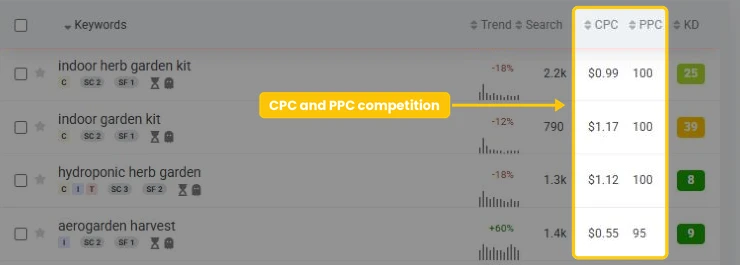
KWFinder shows the CPC and PPC competition next to every KD, so you can quickly compare what ranking would take with what a click costs.
5. Don't be afraid of high difficulty
A high KD is a warning, not a stop sign. If your website is strong in the topic, your content is clearly better than what ranks, or the top results don't match the search intent well, you can still compete.
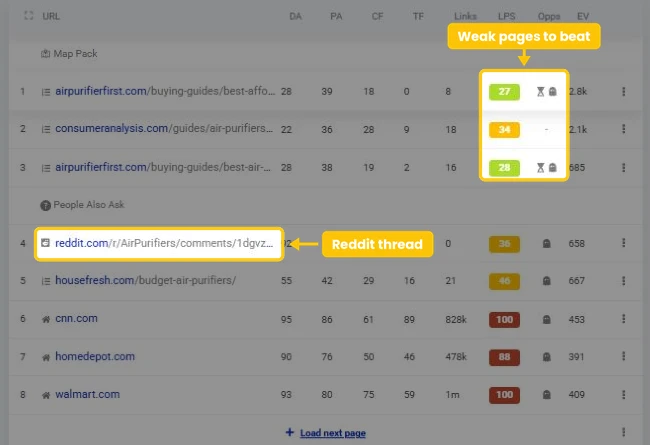
Before you give up on a hard keyword, look for weak spots in the SERP. Even when big brands rank, page 1 often has pages with a low Link Profile Strength, outdated content or no keyword in the title.
KWFinder shows all of this in the SERP overview: the LPS of every page, keyword opportunities, SERP features and content types. A Reddit thread on page 1 is a good sign too, because it often means Google hasn't found a great answer yet.
6. Set realistic expectations and track your rankings
There's no fixed timeline for ranking, but keyword difficulty gives you a good idea of what to expect. As a rule of thumb, a new page for an easy keyword can get onto page 1 within a few weeks to a few months.
Hard keywords often take 6 months or more, and a link-building effort to go with it.
The rest depends on your website's authority, how quickly Google indexes your page and how much better your content is than what already ranks.
Once the page is live, track the keyword in SERPWatcher instead of googling it every day. It checks your positions for you and can email you when the keyword gets into the top 10 (or drops out of it).
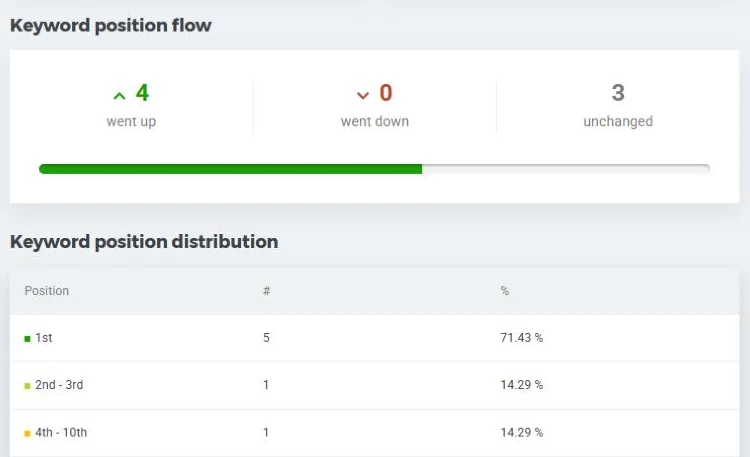
Note: Keyword difficulty changes over time, as new pages enter the SERP and the old ones get stronger. Planned a page months ago? Check its KD again before you start writing.
How to find low-difficulty keywords
Knowing the KD of one keyword is nice. Finding dozens of keywords you can actually rank for is what moves the needle. Here's how to do it in KWFinder:
1. Filter by keyword difficulty
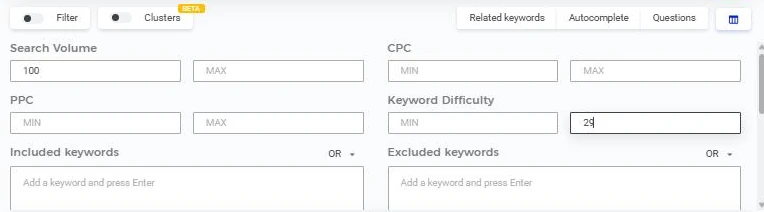
Select Filter above the keyword list and set a maximum Keyword Difficulty, for example 29 to see only "easy" and "still easy" keywords. Add a minimum search volume and you'll be left with keywords that are both rankable and worth the effort. Learn how to filter keywords in KWFinder by any metric.
2. Go for long-tail keywords
Longer, more specific keywords usually have lower difficulty than broad ones, and they often convert better too. In the "indoor herb garden" example, "hydroponic herb garden" has a KD of just 8. Learn how to find long-tail keywords or read our guide to long-tail keywords.
3. Check Autocomplete and Questions
Next to Related keywords, KWFinder shows Autocomplete suggestions from Google and Questions people ask about your keyword.
They're specific by nature, which makes them a great source of easier keywords.
4. Look at competitors of your size
Use Search by Domain on a website with a similar link profile to yours. The keywords it already ranks for are proof that a website like yours can rank for them too.
To see every keyword your competitors rank for and you don't, try the keyword gap analysis.
5. Go local
If you serve a specific city or region, check keyword difficulty there. Local SERPs are often easier than national ones. Learn how to do local keyword research for any city or region.
Tip: Looking for super-low competition keywords for a brand-new website? Check out the Keyword Golden Ratio method.
How to check keyword difficulty manually
Keyword difficulty gives you a quick estimate based on links. But Google ranks pages for many more reasons than links, so before you commit to a keyword, take a minute to look at the SERP itself.
Here's a 5-step check:
1. Check the search intent
Search intent is the reason behind the search. There are 4 basic types:
- Informational - people want to learn something ("how to grow basil indoors").
- Navigational - people look for a specific website or page ("aerogarden login").
- Commercial - people compare options before they buy ("best indoor herb garden kit").
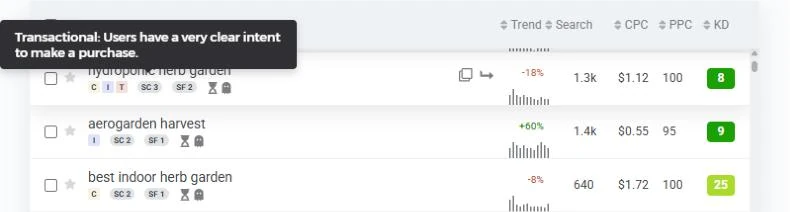
- Transactional - people are ready to buy ("buy indoor herb garden kit").
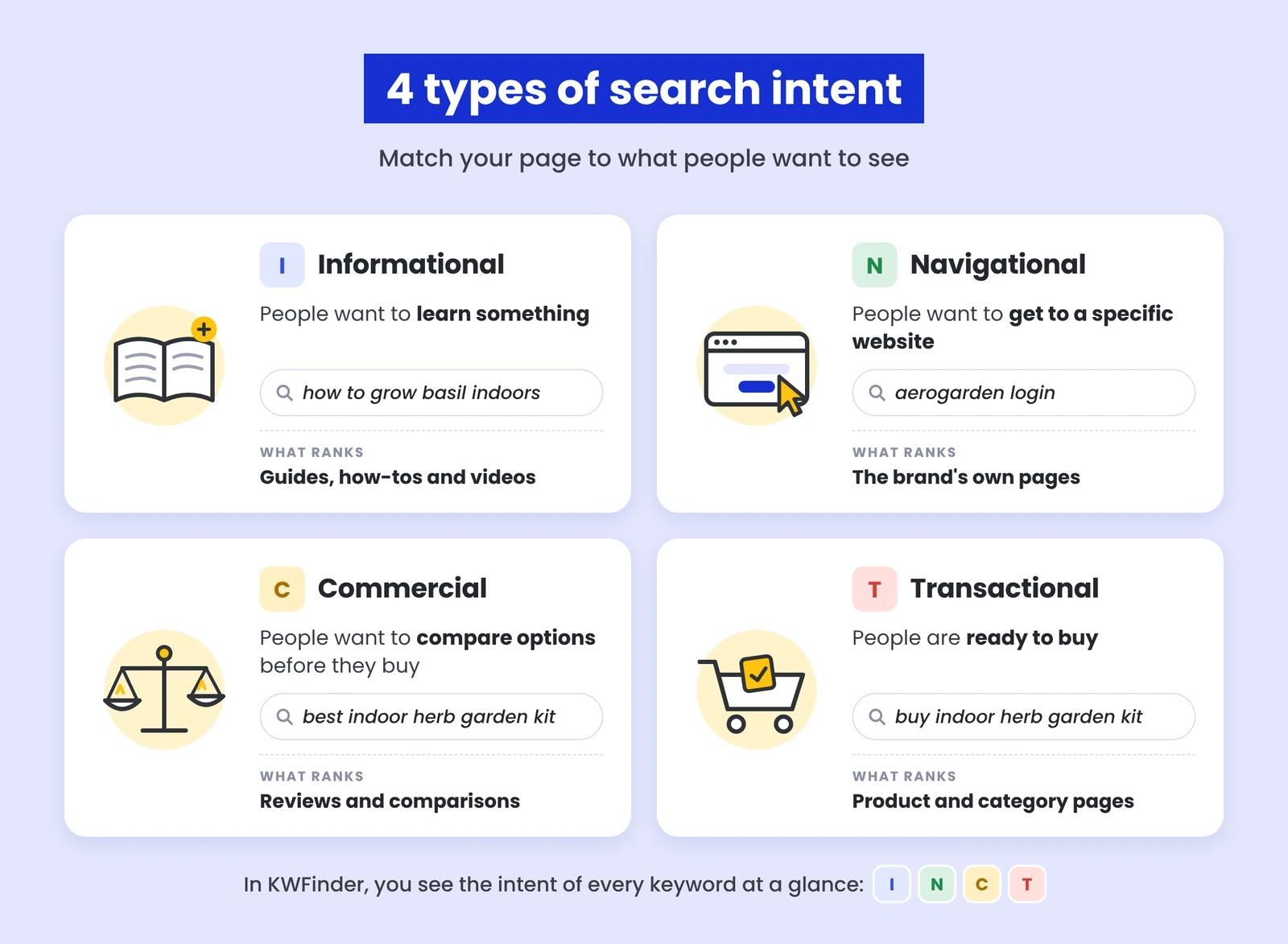
The easiest way to find the intent is to look at what already ranks. If all the top results for "best indoor herb garden" are reviews, you won't rank with a product page, no matter how low the KD is.
KWFinder shows the intent of every keyword as a small letter (I, N, C, T). More in our guide to search intent.
2. Look at the content types
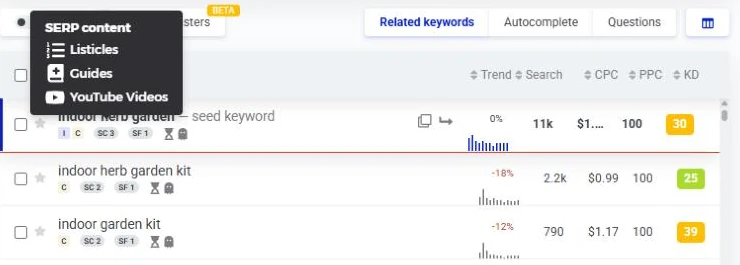
What kind of pages rank? Blog posts, listicles, product pages, YouTube videos or Reddit threads?
KWFinder recognizes 29 content types and shows them next to every result, so you know what format you're up against.
If the top results are interactive tools or calculators, keep in mind that a well-written article alone probably won't beat them.
3. Check the SERP features
An AI Overview, People Also Ask, a Map Pack or Shopping ads push the organic results down the page.
Even with a low KD, a keyword with a crowded SERP may bring fewer clicks than you'd expect.
With an AI Overview, many people get their answer without clicking at all. And if big brands run ads at the top, that's a hint the keyword is both valuable and competitive.
4. Find the weakest page on page 1
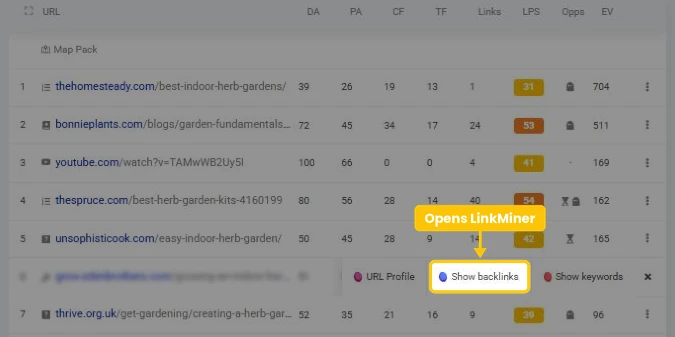
Look at the link metrics of every ranking page and find the weakest one. That's the page you need to beat.
In KWFinder, click the three dots next to any result to open its backlinks in LinkMiner and see what kind of links got it there. Learn more about backlinks and referring domains.
5. Judge the content quality and freshness
Open the top results and ask yourself: can I create something clearly better? KWFinder helps with keyword opportunities. It flags top-5 pages that are outdated (over 6 months old) or don't have all the words of the keyword in their title.
Check their on-page SEO too. If the top pages don't even have the keyword in their title, H1 or meta description, a well-optimized page has a real chance, even against stronger websites.
For a deeper look, open the keyword in SERPChecker or read our guide to SERP analysis.
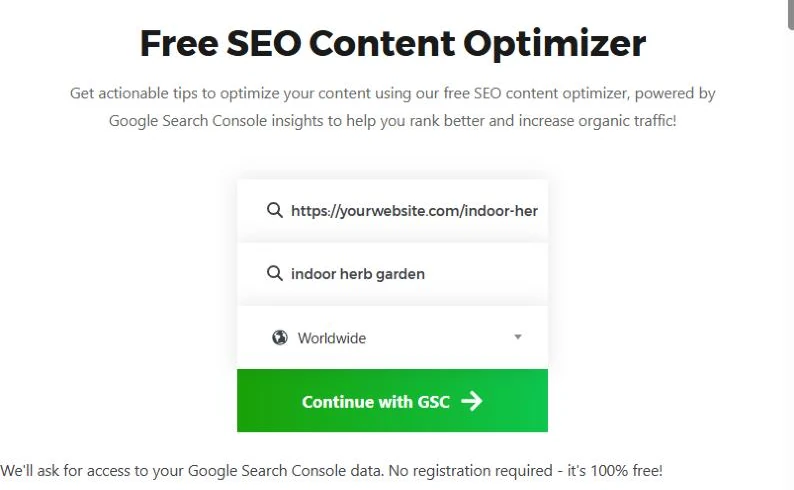
Tip: Already have a page for the keyword? Run it through our free SEO Content Optimizer. It compares your page with the top 5 results and your Google Search Console data and tells you what to fix, from missing words in the title to queries your page doesn't cover yet.
Note: Don't mix up keyword difficulty with the "competition" metric in Google Keyword Planner. Keyword Planner's competition tells you how competitive the ad placements for the keyword are in Google Ads.
It says nothing about how hard it is to rank organically. In KWFinder, you'll find the ads competition in the PPC column.
Why keyword difficulty differs between tools
Check the same keyword in 3 SEO tools and you'll likely get 3 different numbers. That's normal: there's no universal formula for keyword difficulty. The scores differ because the tools:
- Use different inputs - some count only the referring domains of the top-ranking pages. Others mix links with authority scores, search volume or SERP features. Mangools uses the Link Profile Strength of the pages on page 1.
- Answer different questions - some estimate how hard it is to reach the top positions. Mangools KD estimates how hard it is to get onto page 1, which is why it puts the most weight on the weakest pages there.
- Rely on different data - each tool has its own link index, its own snapshots of the SERP and its own update schedule.
- Use different scales - a KD of 40 can mean "medium" in one tool and "hard" in another.
So which number should you trust? Pick one tool and compare keywords within it. The relative difference between two keywords in the same tool tells you much more than comparing KD values across tools.
Tip: Calibrate KD for your own website. Take the keywords you already rank for on page 1 (you'll find them in Google Search Console), import them into KWFinder and look at their KD. The range you already win is the range you can confidently target next.
Check keyword difficulty from your AI assistant
AI assistants are great at explaining SEO, but on their own they don't have any keyword data, so any KD they give you is a guess. Connect the Mangools MCP server and your assistant gets real keyword difficulty, search volumes and SERPs from KWFinder.
It works with Claude, ChatGPT, Cursor, n8n and other assistants that support MCP. Then just ask:
"Find 20 keywords about indoor herb gardens in the US with KD under 30 and at least 100 monthly searches, and group them by topic."
The MCP server and the Mangools API are included in every plan, the free one too. Free accounts get a one-time welcome bonus of 100 keyword lookups and 100 SERP lookups for the API and MCP.
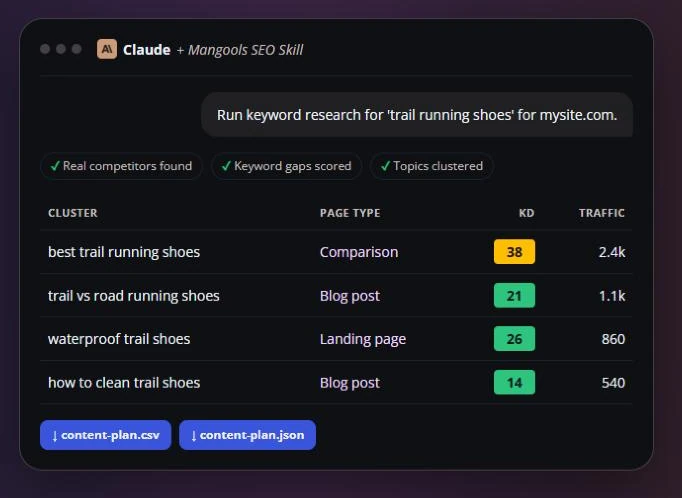
Using Claude? Add the free Mangools SEO skill on top. The MCP server gives your assistant the data, and the skill adds the method: give it a seed keyword and your domain, and it runs the whole keyword research on live KWFinder and SERPChecker data.
You get a ranked content plan with the KD of every topic, ready to download as CSV or JSON. It works on the free Claude plan too.
What people say about Mangools keyword difficulty metric
"…spot-on search volume estimates and keyword difficulty ratings"
"…known for its clean interface and accurate keyword difficulty scores."
"If you’re looking to find low-difficulty SEO keywords for your website, KWFinder is the tool for you."
Frequently asked questions
How accurate is keyword difficulty?
Keyword difficulty is an estimate, not a guarantee. It's based on links, so it can't fully see things like search intent, content quality or topical authority. Use it to compare keywords and shortlist the ones worth your time, then check the SERP itself before you start writing.
How many backlinks do I need to rank for a keyword?
There's no fixed number. It depends on the pages you compete with. Look at the weakest page on page 1 and compare its Link Profile Strength and backlinks with yours. In KWFinder, you can open the backlinks of any ranking page in LinkMiner with one click.
What is the best free keyword difficulty checker?
The best one is the one you trust and keep using, because KD only makes sense when you compare keywords within the same tool. Look for a checker that shows the pages behind the score, lets you check KD for your location and adjusts the score to your own website. KWFinder does all three, with 5 free checks a day.
Find keywords your website can actually rank for
Check keyword difficulty, see who you're up against on page 1 and find the easy wins in your niche, all in one place.
Create a FREE accountNo credit card needed • 5 KD checks a day