Agency Rank Tracking: Track and Report Client SEO Performance
Keep a close eye on your clients’ rankings without turning reporting into a weekly chore. SERPWatcher helps agencies monitor daily keyword changes, track desktop and mobile results in 65k+ locations, compare competitors, and share reports clients can actually use.
What is agency rank tracking?
Agency rank tracking is the process of monitoring how client websites perform in Google Search for the keywords that matter most to their business.
Instead of checking rankings manually, an agency rank tracker gives you ongoing visibility into keyword positions, changes over time, location-specific results, device-based differences, and the overall direction of a campaign.
For agencies, that matters because rankings are not static.
A client may perform differently on desktop and mobile, in one city versus another, or across different keyword groups tied to separate services, locations, or landing pages.
Good agency rank tracking helps you catch those differences early and report them clearly.
Why is agency rank tracking important?
1. Clients care about progress, not isolated keyword checks
A single keyword moving up or down is useful, but agencies need a broader view of SEO performance.
Daily updates, historical data, and aggregate visibility metrics make it easier to explain whether a campaign is actually improving over time.
2. Rankings vary by location and device
The same keyword can produce different results depending on where the search happens and whether it is made on desktop or mobile.
If you manage local businesses, regional campaigns, or clients with multiple markets, agency rank tracking needs to reflect that reality.
3. Reporting should not eat up your team’s time
Agencies do not just need data. They need a fast way to organize keywords, monitor major ranking changes, and share updates with clients or teammates without rebuilding the same report over and over.
Interactive reports, alerts, and keyword tagging make that workflow much easier.
What sets Mangools SERPWatcher apart from other agency rank trackers?
Client-friendly reporting without the usual reporting busywork
SERPWatcher includes interactive shared reports that clients can open in the browser and explore on their own.
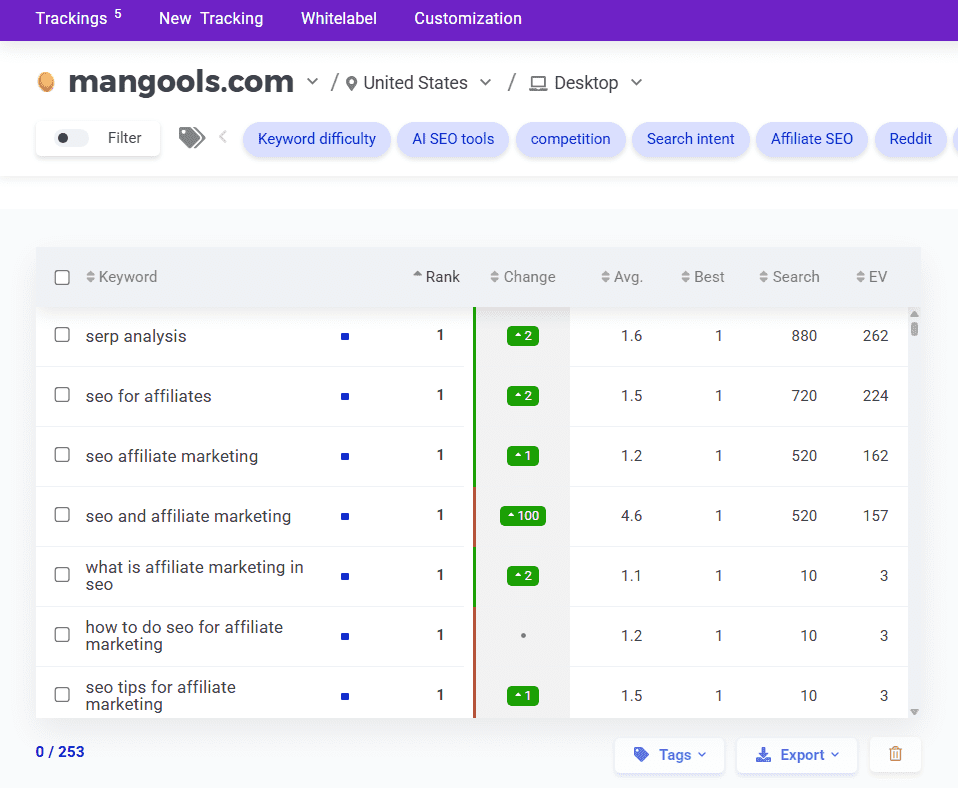
They can review tracked keywords, filters, charts, keyword details, and time frames without needing a static export every time they want an update.
Mangools also supports white-label reporting and a Looker Studio connector for agencies that want more branded or customized reporting workflows.
Daily rank tracking built for action, not clutter
SERPWatcher updates rankings daily and shows current positions, changes, historical data, and keyword-level details in a simple interface.
Our rank tracking tool is simple and user-friendly, which makes it a strong fit for agencies that need fast answers instead of bloated dashboards.
Track rankings where your clients actually compete
Agencies rarely manage just one market. SERPWatcher supports 65k+ locations and both desktop and mobile tracking, so you can monitor national campaigns, local SEO projects, and location-specific visibility without changing tools.
Competitor context for every campaign
Rankings make more sense when you can benchmark them. SERPWatcher includes competitor rank tracking—this gives agencies a better way to spot gaps, justify priorities, and show clients where rivals are winning.
A better way to organize client campaigns
SERPWatcher lets you organize tracked keywords with tags. For agencies, that means you can group keywords by client priority, service line, page type, location, funnel stage, or whatever internal structure your team uses.

It is a simple feature, but it solves a very real workflow problem once campaigns start growing.
Easy keyword onboarding from your existing workflow
Our rank tracking tool needs only a domain, location, platform (mobile or desktop), and keywords to start tracking.
You can import keywords from KWFinder, paste or upload lists—it also supports importing important terms directly from Google Search Console into SERPWatcher.
How to track client rankings with Mangools SERPWatcher
Tracking rankings for clients with SERPWatcher is pretty simple and straightforward:
- Create your Mangools account.
- Open SERPWatcher and click Create new tracking.
- Enter the client’s domain.
- Choose the location you want to track.
- Select desktop or mobile.
- Add the keywords you want to monitor.
- Launch the tracking and review daily updates, alerts, and report-sharing options.
You can also build your keyword list in KWFinder first or import important queries from Google Search Console and then monitor them in SERPWatcher over time.
Who should use an agency rank tracker?
Agency rank tracking is useful for SEO agencies, freelancers, consultants, and in-house teams that need a reliable way to monitor rankings for multiple stakeholders.
It is especially valuable when you need location-specific tracking, competitor context, clearer reporting, and a workflow that does not force your team into manual rank checks every day.
Frequently asked questions
How do agencies track client keyword rankings?
The usual approach is to create a tracking campaign for each client, choose the right location and device, add the keyword set you want to monitor, and review movement over time instead of relying on one-off checks.
SERPWatcher supports that with daily updates, historical data, and location/device-based tracking.
Can I share agency rank tracking reports with clients?
Yes. SERPWatcher offers interactive shared reports, white-label reporting, and a Looker Studio connector for more customized reporting setups.
Can I track desktop and mobile rankings separately?
Of course. SERPWatcher supports both desktop and mobile tracking, which is important because rankings can differ by device.
Is it possible to monitor competitors in SERPWatcher?
Yes. You can add your competitors to the rank tracking tool and start comparing your website’s ranking performance against theirs.
Can I import keywords from Google Search Console?
Yes. You can import important keywords directly from Google Search Console into SERPWatcher (or KWFinder) and start tracking them daily.
Does SERPWatcher have a Looker Studio connector?
Yes. Mangools has a SERPWatcher Looker Studio connector for pulling rank-tracking data into Looker Studio dashboards and reports.
Start tracking your clients’ SERP positions now
Set up your first agency rank tracking in less than 30 seconds and give clients a clearer view of SEO progress without the reporting mess.