SERP Alerts Tool: Get Ranking Notifications and Reports
Stay updated when rankings change and share reports people will actually use. SERPWatcher helps you monitor keyword movements with automatic email alerts, send scheduled ranking reports, and share interactive reports with clients or teammates.
What is a SERP alerts tool?
A SERP alerts tool helps you monitor changes in your keyword rankings and get notified when something important happens.
Instead of checking positions manually every day, you can rely on alerts and reports to keep track of movements, trends, and overall SEO progress.
For most teams, SERP alerts are only useful when they are connected to real rank tracking data and presented in a way that is easy to understand.
That is why a good SERP notifications tool should not just send updates. It should also help you review keyword details, compare time frames, and share progress with clients or coworkers without extra manual work.
Why are SERP notifications important?
1. Ranking changes can happen before you notice them in traffic
When important keywords rise or drop, you want to know early.
Alerts help you react faster to meaningful ranking shifts instead of discovering them days later in a report or after traffic has already changed.
2. Manual rank checking does not scale
Once you track more than a handful of keywords, checking positions manually becomes slow and unreliable.
SERPWatcher’s workflow is built around weekly ranking updates (daily on the Agency plan), tracked keyword details, and automated reports and alerts, which is much more practical for ongoing SEO work.
3. Teams and clients need updates in a usable format
A notification is helpful, but it is usually not enough on its own.
Clients and teammates often need context: what changed, over what time period, and which keywords matter most.
Interactive browser-based reports solve that better than static exports alone.
How to utilize Mangools SERPWatcher for SERP alerts?
Interactive reports instead of static report dumps
SERPWatcher’s shared reports are designed to be viewed directly in the browser.
Users can access tracked keywords, keyword details, filters, charts, and preferred time frames to review progress over time.
That makes the page stronger than a basic “notification-only” tool and much closer to how agencies and in-house teams actually communicate SEO results.
Event-based alerts for ranking changes that matter
SERPWatcher sends automatic alerts based on important ranking events.
Whether it’s top 10 or top 100 event, you’ll be notified. Set up more alerts depending on your needs.
This will help you see any meaningful ranking changes immediately, instead of turning every update into noise.
Scheduled email reports for regular updates
Beyond alerts, our rank tracking tool also supports scheduled reports.
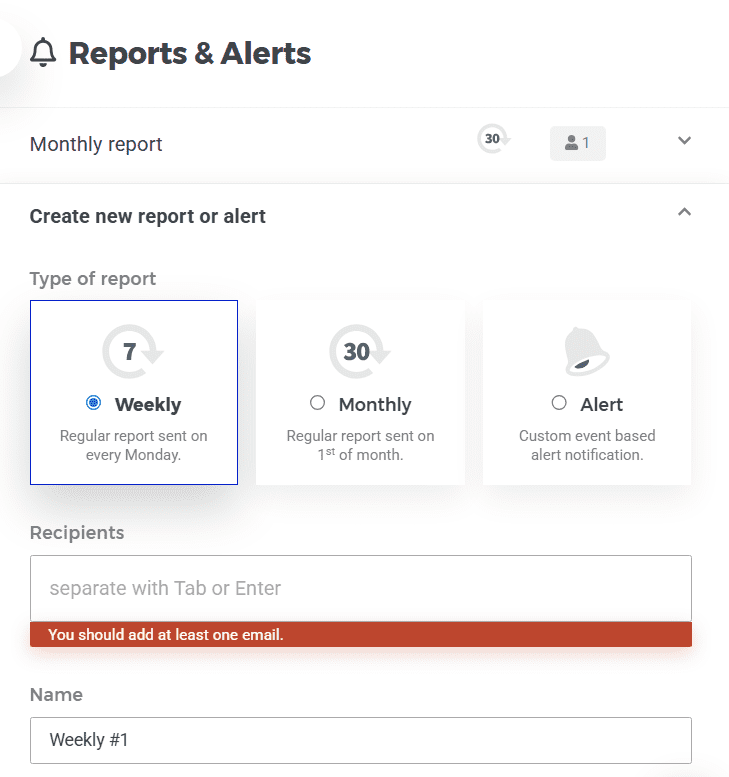
You can set up weekly and monthly reports, recipient fields, and editable report settings, which makes it useful for routine client communication and team updates.
White-label reporting for agencies and consultants
SERPWatcher includes white-label report settings for logo, accent color, company name, company website, and contact email—with all the rank tracking data ready to be presented to your clients or agency.
It also supports custom report URLs on your own domain or subdomain, which is a meaningful advantage for agencies that want a more branded reporting experience. Learn more about white-label SEO reports.
Looker Studio connector for more customized reporting
If you need something more tailored than the built-in shared report, Mangools also provides a SERPWatcher Looker Studio connector.
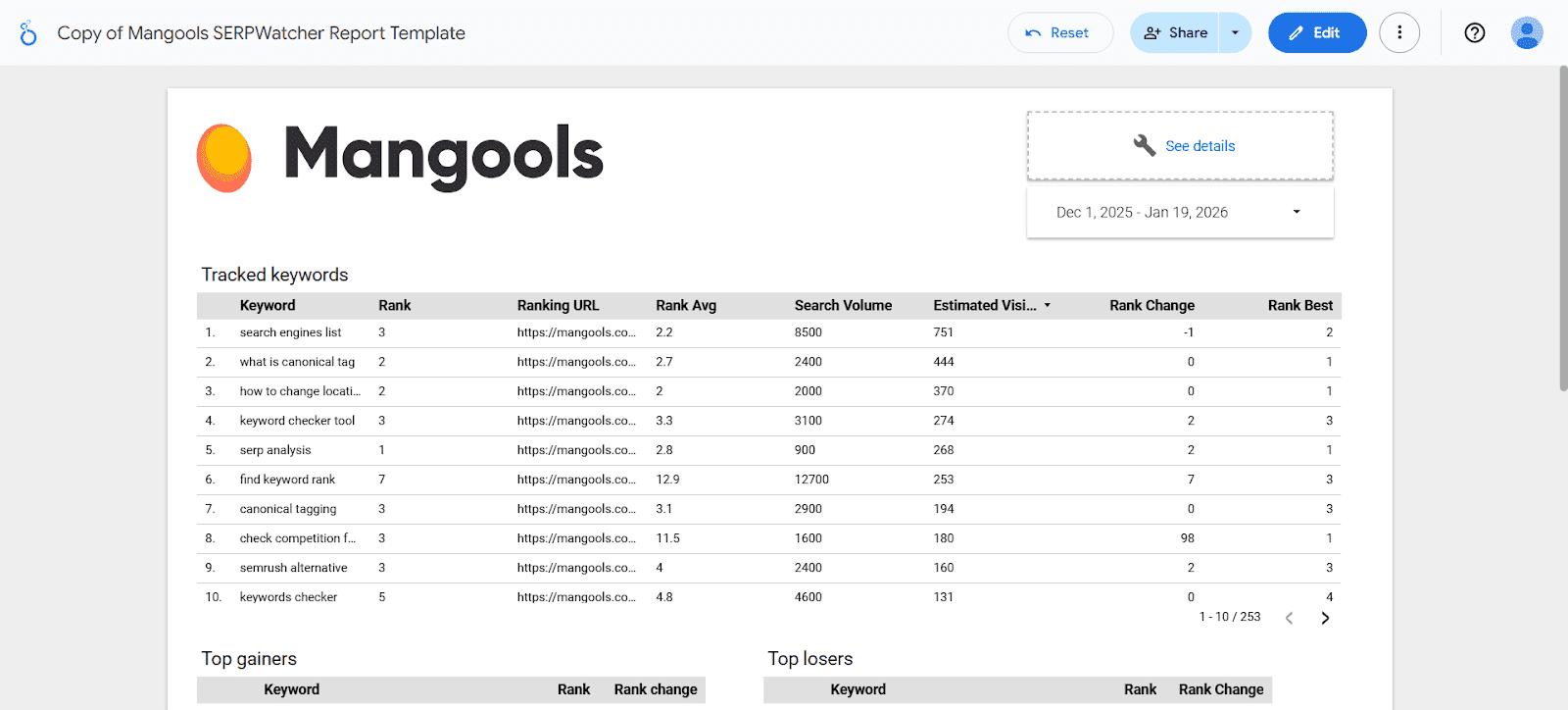
You can pull in ranking data and build custom dashboards around keyword rankings, ranking changes, search volumes, and average or best positions.
Simple workflow, weekly updates (daily on Agency), and organized keywords
Besides standard rank tracking, you can also divide your tracking data into desktop/mobile rankings, see top gainers and losers in terms of keywords and organize your most important queries into individual tags.
This will help you see all important ranking alerts in a neatly organized and easy-to-navigate dashboard, making it simpler to track performance and take action quickly.
How to set up SERP reports and alerts with SERPWatcher
Setting up reports and alerts in SERPWatcher is simple:
- Create your Mangools account and start a tracking.
- Add your domain, location, platform, and keywords.
- Open the tracking and click Reports & Alerts.
- Choose whether you want to create a scheduled report or an alert.
- For reports, select the frequency and add recipients.
- For alerts, choose the trigger (changes in keyword positions), add recipients, and name the alert.
- Save the setup and edit or delete it anytime later.
Who should use a SERP notifications tool?
A SERP notifications tool is useful for SEO agencies, freelancers, consultants, in-house marketers, ecommerce teams, and anyone responsible for tracking keyword performance over time.
It becomes especially valuable when you need to monitor many keywords, keep clients informed, or catch important ranking changes without checking your campaigns manually every day.
Tip: You can also use our free SERP volatility checker to see any significant changes in Google SERPs and get notifications if there are sudden ranking fluctuations that could impact your website’s visibility.
Frequently asked questions
What is the difference between a SERP alerts tool and a rank tracker?
A rank tracker measures your keyword positions over time. A SERP alerts tool adds notifications and reporting on top of that data, so you do not have to review everything manually.
In SERPWatcher, alerts and reports are part of the broader rank-tracking workflow.
Can SERPWatcher send automatic ranking alerts?
Yes. SERPWatcher supports custom event-based automatic alerts for important ranking changes.
You can set up alerts for dramatic movement and threshold events such as top 10 or top 100 keyword position changes.
Can I get scheduled ranking reports by email?
Yes. SERPWatcher supports scheduled email report setup with weekly and monthly frequencies, recipients, and editable settings.
Can I share ranking reports with clients?
Yes. SERPWatcher provides interactive shared reports that people can open in the browser and explore using filters, keyword details, charts, and time-frame selection.
Can I white-label SERPWatcher reports?
Yes. SERPWatcher includes white-label options for branding and also supports custom report URLs on your own domain or subdomain.
Is it possible to use Looker Studio with SERPWatcher?
Absolutely! Mangools has a SERPWatcher Looker Studio connector that lets you use rank-tracking data in custom reports and dashboards.
Start tracking your SERP positions now
Set up your first rank tracking in less than 30 seconds, get notified when important rankings move, and share reports that make SEO progress easier to understand.