Monthly Keyword Rank Tracker Reports: Interactive SEO Reports
Create monthly keyword rank tracker reports backed by weekly keyword tracking (daily on the Agency plan). Share interactive reports, schedule monthly emails, and show SEO progress with the metrics that actually matter in SERPWatcher.
What are monthly keyword rank tracker reports?
Monthly keyword rank tracker reports show how your tracked keywords performed over a selected month.
A good monthly report should do more than list current positions. It should help you understand how rankings changed over time, what happened to your overall search performance, which keywords gained or lost visibility, and where the biggest SEO opportunities are.
In SERPWatcher, monthly reporting is backed by weekly rank updates and flexible time frames, so you can evaluate the whole month instead of relying on a single snapshot.
The term is usually used with two slightly different meanings:
- Monthly keyword rank tracker reports as recurring reports sent to clients or teammates
- Monthly keyword rank tracker reports as a month-over-month view of keyword positions, visibility, and estimated traffic impact
Why are monthly keyword rank tracker reports important in SEO?
SEO performance rarely moves in a perfectly straight line. Rankings go up and down all the time, but the monthly view helps you understand the bigger picture.
Instead of reacting to every daily fluctuation, you can use monthly keyword rank tracker reports to measure actual progress, spot important changes, and decide what to do next.
By reviewing monthly keyword rank tracker reports, you’ll:
- Get a clearer overview of ranking trends instead of overreacting to daily noise
- Show clients or teammates what changed during the month in a format they can actually understand
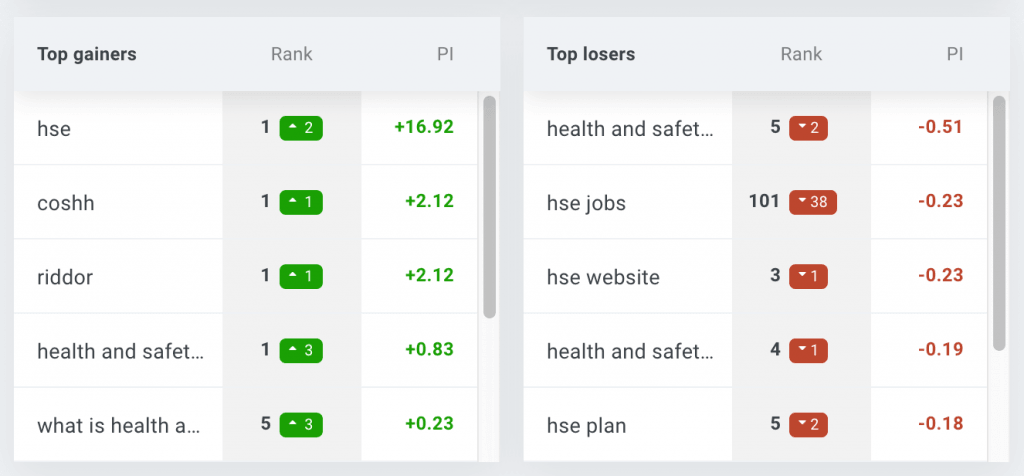
- Identify top gainers, top losers, and shifts in keyword position distribution
- Measure SEO progress with aggregate metrics, not only isolated keyword positions
- Compare performance by tags, locations, and devices when needed
Monthly keyword rank tracker reports in SERPWatcher
Very often, keyword ranking reports are treated as static PDFs sent at the end of the month.
SERPWatcher takes a different approach.
Its shared reports are interactive, available directly in the browser, and let recipients work with tracked keywords, keyword details, filters, charts, and time frames. That makes the report more useful for both internal teams and clients.
Forget about out-of-date PDFs. It’s all about being online and efficient.
What should a good monthly keyword rank tracker report include?
A useful monthly keyword rank tracker report should include a couple of core SEO elements:
1. Current keyword positions and their changes
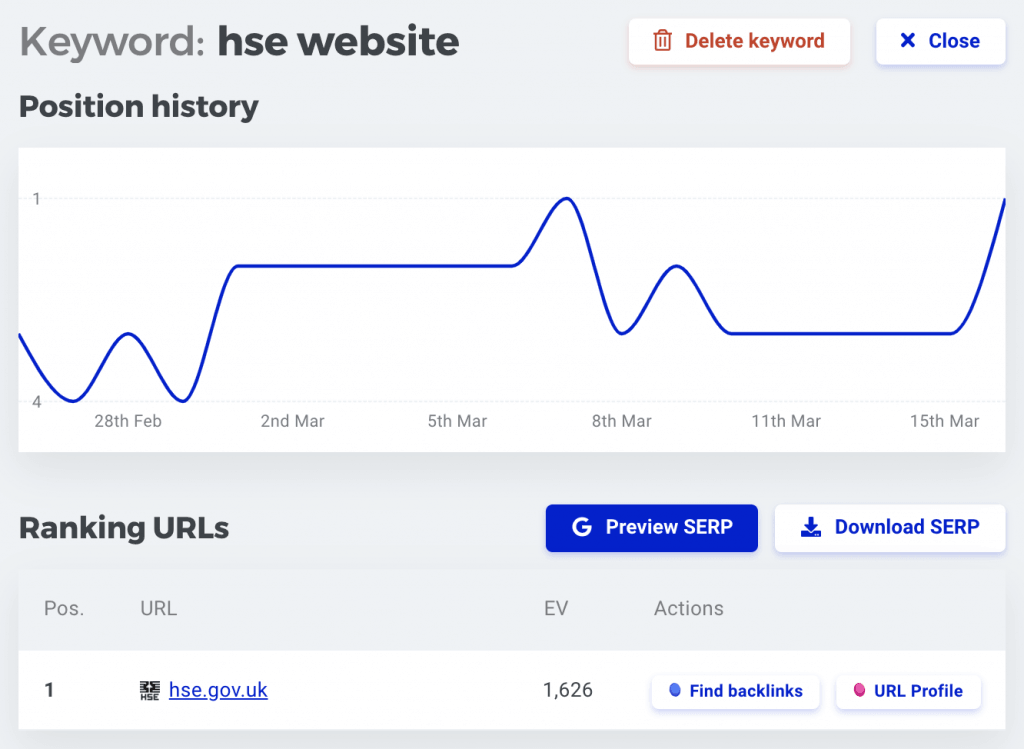
At the very least, you need to see where your tracked keywords rank now and how those positions changed during the selected month.
SERPWatcher shows current positions, changes, and historical data, so you can review performance at both the overview level and the individual keyword level.
2. Overall performance, not just isolated ranks
A report full of individual positions can be overwhelming.
That’s why aggregate metrics matter.
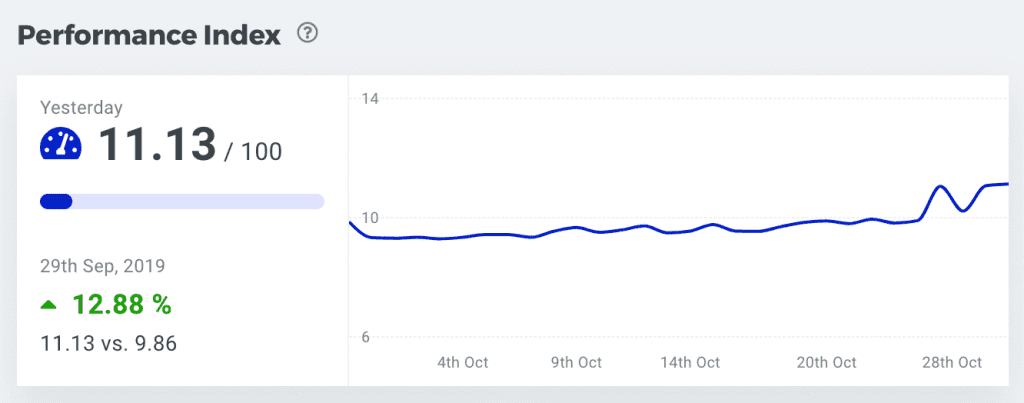
SERPWatcher’s main performance metric is the Performance Index, which tracks your ranking performance based on your actual keyword positions and their search volumes. It helps you judge your overall SEO progress at a glance.
3. Estimated traffic impact
Rank changes only become meaningful when you understand their impact.
That’s why monthly reports should go beyond raw keyword positions.
SERPWatcher helps you evaluate the estimated traffic potential of your tracked keywords, so you can see whether ranking improvements are likely to move the needle.
4. Highlights of the month
A monthly report should make it easy to spot what changed the most.
Besides current rankings, it’s useful to see the strongest moments during the selected period.
This helps you notice not only where you rank now, but also the best positions and strongest estimated-visit highlights achieved during the month.
5. Keyword position distribution
It’s useful to know not just where one keyword ranks, but how your tracked portfolio is distributed across the SERP.
A good monthly report should show how many keywords rank in top positions and how that distribution changes over time.
That makes reporting more strategic and less keyword-by-keyword.
6. Segmentation by tag, location, and device
Monthly reports become much more actionable when you can break them down by landing page, topic cluster, service, category, location, or platform.
SERPWatcher supports keyword tags, desktop and mobile tracking, and location-based tracking, so you can build much more meaningful monthly views.
7. Easy sharing for clients and teammates
A monthly report is only valuable if people can actually use it.
SERPWatcher lets you share interactive reports with a link, schedule email reports, and use white-label reporting for a cleaner client-facing presentation.
Note: Interactive reports are especially useful for monthly reporting because clients and teammates can explore tracked keywords, filters, charts, and time frames on their own.
How to create monthly keyword rank tracker reports?
In SERPWatcher, you can create monthly keyword rank tracker reports right after setting up your tracking.
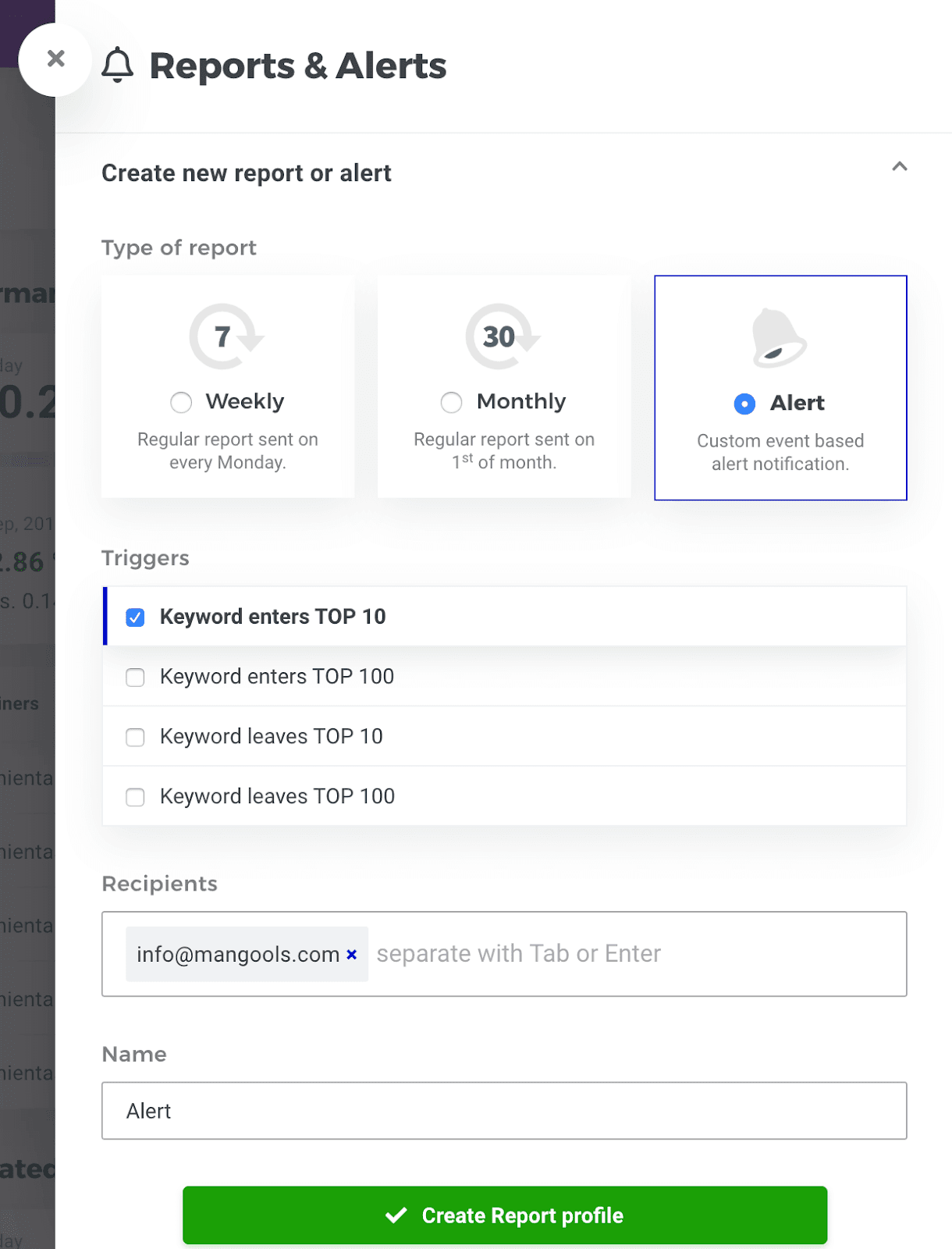
All you have to do is create a tracking for your domain, select the location and platform, add your keywords, switch to the monthly time frame, and set up the report from the reporting section.
To do this, simply:
- Open SERPWatcher and create a new tracking.
- Enter your domain, location, and search platform.
- Add your tracked keywords.
- Select the monthly time frame in the dashboard.
- Open the reports and alerts settings.
- Choose the monthly report option.
- Add recipients.
- Name the report.
- Optionally share the interactive report link or apply white-label settings.
If you want a more customized reporting workflow, you can also connect your data to Looker Studio.
Create a FREE accountHow to use monthly keyword rank tracker reports in your SEO strategy
1. Focus on the trend, not one isolated fluctuation
The biggest value of monthly reporting is perspective.
A monthly report helps you spot direction. Use it to evaluate trends, not to panic over one temporary movement.
2. Report on keyword groups, not only total averages
A single overall number rarely tells the whole story.
Use tags to split keywords into blog posts, product pages, service pages, categories, campaigns, or locations.
That way, your monthly report shows where growth happened instead of only confirming that something changed.
3. Pair rankings with traffic potential
A ranking improvement is much more important when it happens on a high-volume keyword.
That’s why monthly reports should combine positions with broader performance metrics instead of focusing on positions alone.
4. Make the report easy to consume
A monthly keyword rank tracker report should reduce friction, not create more of it.
Shared interactive reports are often easier for clients and teammates to use than static files because they can filter keywords, inspect details, and switch time frames on their own.
5. Keep location and device context in mind
Rankings can vary by country, city, and device. A monthly report is much more reliable when it reflects the actual search environment you care about.
6. Use monthly reporting as a starting point, not the final answer
A monthly report tells you what changed. It does not always tell you why.
Once you spot important movement, you can drill deeper into keyword details, inspect the SERP snapshot, or continue your analysis in the rest of the Mangools suite.
Create your monthly keyword ranking reports now
Set up your ranking reports in less than 30 seconds and see how your business performs on regular basis.