
Hey there! 👋
The Mangools SEO API isn’t new. It has given developers the data behind our tools for a while: keyword metrics, live SERPs, rankings, backlinks, domain profiles and AI search visibility.
But until recently, using it meant reading the docs and writing every request by hand.
Over the past weeks, we shipped the missing pieces: an official OpenAPI specification, SDKs for Python and TypeScript, a public Postman collection and docs where you can call any endpoint right from the browser. Everything is open on GitHub.
Here’s what each piece does and how to make your first call in a few minutes.
Here’s what’s inside:
- What you can do with the Mangools API
- OpenAPI specification
- Python SDK
- TypeScript SDK
- Postman collection
- Interactive API docs with Try it
- Not a developer? Use n8n, an AI assistant or our SEO skill
- Before you ship: rate limits and lookups
- What you can build with the Mangools API
- A note on versions and support
- Frequently asked questions
TL;DR
- OpenAPI spec: all 82 API operations at api.mangools.com/v3/openapi.json, mirrored daily in mangools/api-spec.
- Python SDK:
pip install mangools(mangools/sdk-python). - TypeScript SDK:
npm install mangools-api-client(mangools/api-client-typescript). - Postman: every endpoint in a public Mangools API workspace, ready to fork.
- Try it docs: send real requests from any endpoint page on apidocs.mangools.com.
- No-code options: an n8n integration, the Mangools MCP server for AI assistants and a keyword research skill for Claude.
What you can do with the Mangools API
One REST API covers all six Mangools tools. Here’s what each part gives you:
| Tool | What you get through the API | Example endpoint |
|---|---|---|
| KWFinder | Related keywords with search volume, CPC and keyword difficulty, competitor keywords, keyword gap analysis, keyword lists | GET /kwfinder/related-keywords |
| SERPChecker | Live SERPs with SEO metrics for every result, SERP snapshots | GET /serpchecker/serps |
| SERPWatcher | Trackings, tracked keywords, ranking stats, reports, tags and annotations | POST /serpwatcher/trackings/{tracking_id}/stats |
| LinkMiner | Backlinks, URL metrics, favorite links and exports | GET /linkminer/links |
| SiteProfiler | Domain overview, audience, backlink profile, top content and competitors | GET /siteprofiler/overview |
| AI Search Watcher | AI models, brand monitors, prompts and monitor settings | GET /aiwatcher/monitors |
That’s 82 operations in total, including a shared location search. Every request authenticates with your API key in the x-access-token header. Note that it’s a plain API key, not an Authorization: Bearer token, which is the most common first mistake.
Want a closer look at one part? The Keyword Research API and Rank Tracking API pages go through what each one covers.
You’ll find your key at mangools.com/api-token. Every account has one, including free accounts.
OpenAPI specification
The complete, machine-readable description of the API lives at api.mangools.com/v3/openapi.json. It’s an OpenAPI 3.0.3 document with every operation, parameter, request body and response schema, and the API itself serves it, so it’s always current.
A copy is mirrored in the mangools/api-spec repository on GitHub. A scheduled job downloads it every day and commits it when something changed, so you can browse it, diff it and link to a specific version. If your tools still point at the older swagger.json address, nothing breaks: it returns the very same document.
What can you do with it?
- Generate a client in any language. Every operation has a tool-prefixed
operationId(likeget-kwfinder-serps), which generators turn into readable method names. - Import it into Postman, Insomnia or another HTTP client.
- Give it to an AI agent or an agent framework, so it knows exactly which endpoints exist and what they return.
npx @openapitools/openapi-generator-cli generate \
  -i https://api.mangools.com/v3/openapi.json \
  -g go -o ./mangools-client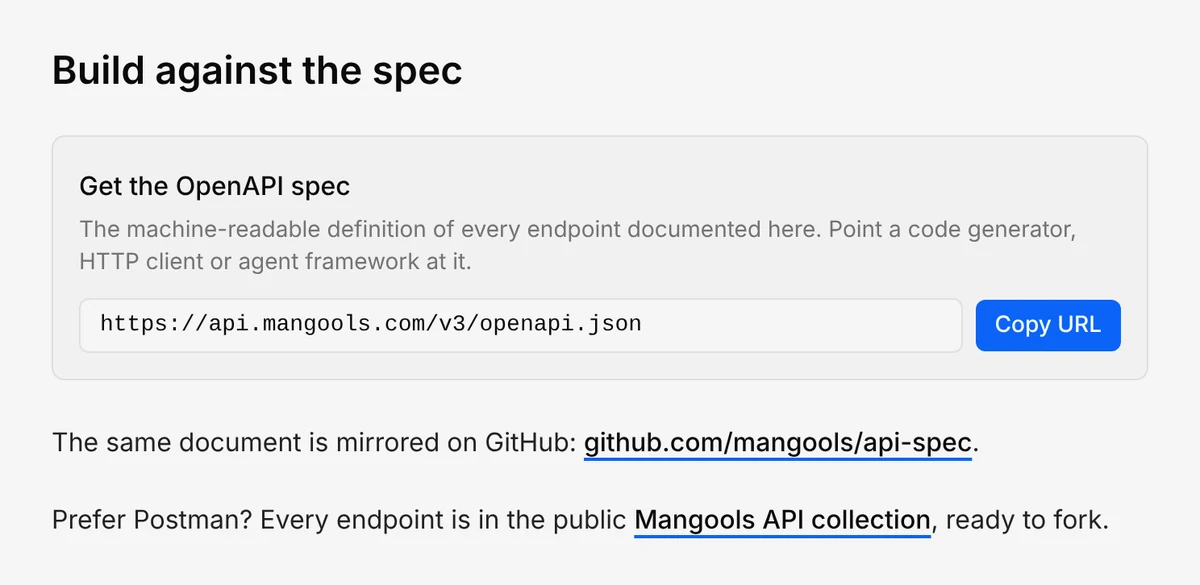
Python SDK
pip install mangoolsThe Python SDK needs Python 3.9 or newer, and every release is tested on all versions from 3.9 to 3.14. It’s built on httpx, fully typed and generated from the OpenAPI document, so the shape of the API is the shape of the SDK.
Here’s how to get related keywords for a seed keyword in the United States (location ID 2840):
import os

from mangools import MangoolsClient
from mangools.api.kwfinder import get_kwfinder_related_keywords
from mangools.models import Error

client = MangoolsClient(api_key=os.environ["MANGOOLS_API_KEY"])

result = get_kwfinder_related_keywords.sync(client=client, kw="standing desk", location_id=2840)
if isinstance(result, Error):
    raise SystemExit(f"{result.error.type_}: {result.error.message}")

for keyword in (result.keywords or [])[:5]:
    print(keyword.kw, keyword.sv, keyword.cpc, keyword.seo)
In the response, sv is the search volume, cpc the cost per click and seo the keyword difficulty.
A few things worth knowing:
- Every endpoint is a module under
mangools.api.<tool>with four functions:sync,sync_detailed,asyncioandasyncio_detailed. Use the detailed ones when you need the status code or headers. - API errors come back as an
Errorobject with a type and a message (andretry_afteron a 429), so error handling is a simple type check. - Optional fields that the API leaves out are
Unset, notNone.Unsetis falsy, which is why the example usesresult.keywords or [].
You can find source code and more examples here: github.com/mangools/sdk-python.
TypeScript SDK
npm install mangools-api-clientThe TypeScript SDK is typed from the spec and runs on fetch, so it works in Node 18+, Deno, Bun and edge runtimes, with both ESM and CommonJS.
The same keyword request looks like this:
import { MangoolsClient } from 'mangools-api-client';

const mangools = new MangoolsClient({ apiKey: process.env.MANGOOLS_API_KEY! });

const { data, error } = await mangools.GET('/kwfinder/related-keywords', {
  params: { query: { kw: 'standing desk', location_id: 2840 } },
});
if (error) throw new Error(`${error.error.type}: ${error.error.message}`);

for (const k of data.keywords?.slice(0, 5) ?? []) {
  console.log(k.kw, k.sv, k.cpc, k.seo);
}
There are no invented method names to learn. You call the HTTP method with the path from the docs, and your editor autocompletes the parameters and the response fields. Requests don’t throw on HTTP errors: a successful response fills data, a failed one fills error.
Important: Call the API from server-side code only. It doesn’t accept cross-origin requests from browsers, and an API key in front-end code is visible to every visitor of your site.
Source code and more examples: github.com/mangools/api-client-typescript.
Postman collection
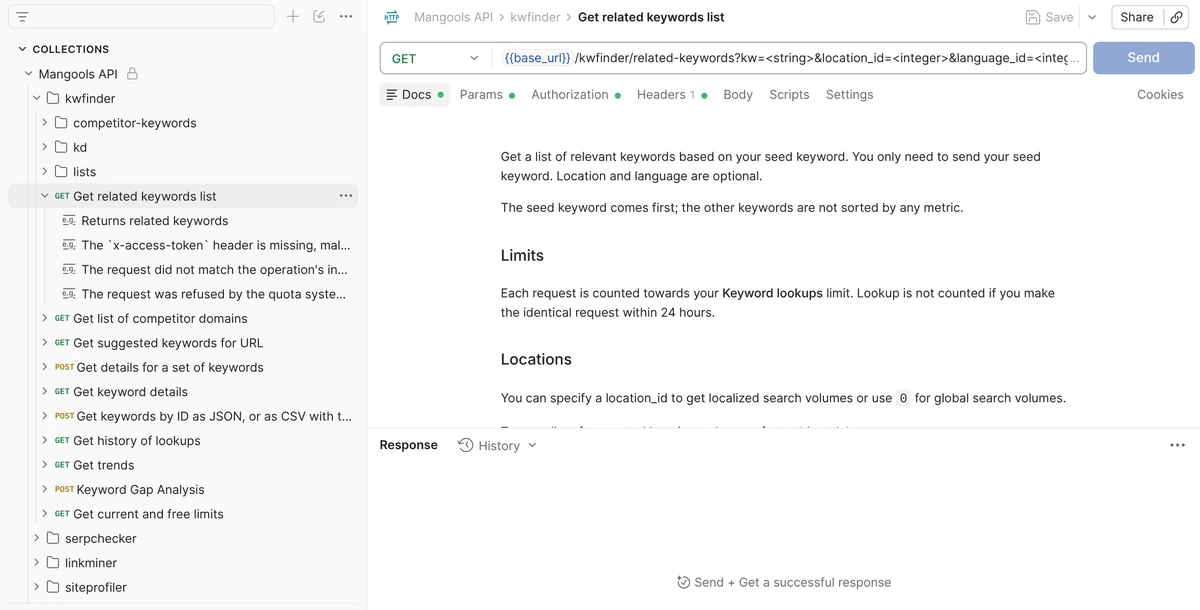
If you want to explore the API before writing any code, the public Mangools API workspace on Postman has all 82 requests, organized by path. Fork the collection, paste your key into the api_key variable and start sending requests.
The collection is built from the OpenAPI document and gets updated whenever the spec changes, so it doesn’t fall behind the API.
Interactive API docs with Try it
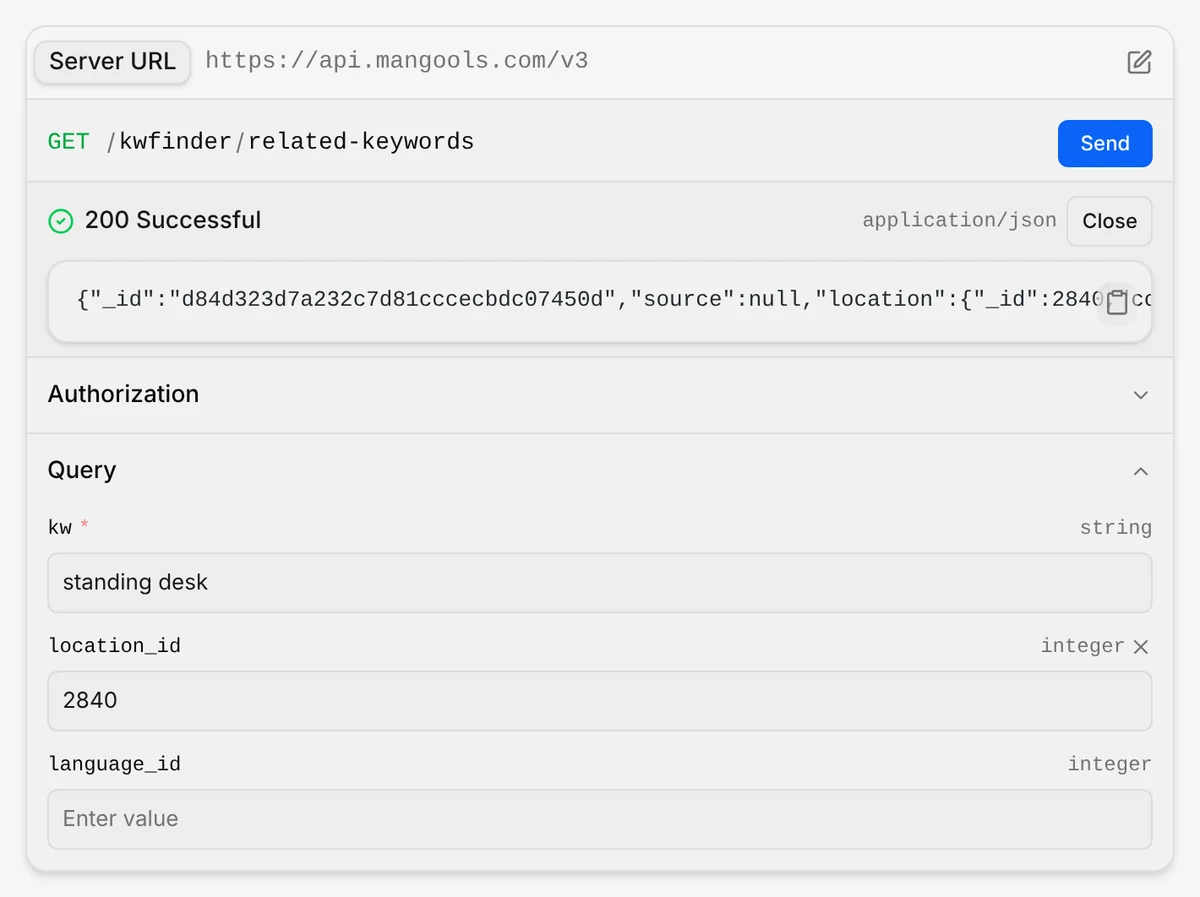
Every endpoint page on apidocs.mangools.com now has a Try it panel. Paste your API key, fill in the parameters and send a real request to the live API without leaving the docs. It’s the fastest way to see what a response actually looks like before you build anything around it.
The docs are generated from the same OpenAPI document as the SDKs and the Postman collection, so all of them describe the same API.
Not a developer? Use n8n, an AI assistant or our SEO skill
You don’t have to write code to work with Mangools data outside the apps:
- n8n: connect Mangools to n8n and import ready-made workflows for keyword research, a weekly rank report in Slack and an AI SEO assistant. There’s also a read-only community node, n8n-nodes-mangools, with 25 operations. Our n8n SEO automation post walks you through all of it.
- AI assistants: the Mangools MCP server connects Claude, ChatGPT, Cursor, Claude Code and other MCP clients to Mangools. You sign in with your Mangools account and ask questions in chat.
- SEO skill for Claude: our keyword research skill turns one seed keyword and your domain into a full research run on live KWFinder and SERPChecker data: real competitors, long-tail keywords, a keyword gap analysis, People Also Ask questions and a ranked list of up to 12 pages to create, with CSV and JSON files to download.
Before you ship: rate limits and lookups
A few rules will save you from the most common 429 errors.
Pace your requests: API-key clients (curl, the SDKs, n8n HTTP Request nodes) can send 3 requests per 30-second window, per account and per quota pool.
In practice, send lookups one at a time and leave at least 11 seconds between two requests to the same pool, counted from the moment the previous response arrived.
Running requests in parallel only gets you refused faster.
Read the 429 before you retry. The error body tells you what happened:
"type": "RateLimit"means you were too fast. Wait the number of seconds inretry_afterand send the same request again, once."type": "CreditLimit"means the quota pool is spent. Waiting won’t help, so checkGET /kwfinder/limitsand stop.
Know what costs lookups: KWFinder, SERPChecker, LinkMiner and SiteProfiler lookups come from your plan’s daily or monthly pools.
On standard Mangools plans, lookups through the API and MCP count double, so one related-keywords request uses 2 keyword lookups.
Reading SERPWatcher and AI Search Watcher data costs nothing, and an identical request repeated within 24 hours is served from cache for free. Keyword imports are the exception: they’re counted every time.
GET /kwfinder/requests. GET /kwfinder/limits answers with HTTP 200 even for a wrong key (it just reports every limit as zero), so it’s not a good test.The rate limits page in our docs has all the details, including a retry function you can copy.
Free account? Start with the welcome bonus
Every Free and Free+ account with a confirmed e-mail gets a one-time API & MCP welcome bonus of 100 keyword and 100 SERP lookups.
While it lasts, each request costs 1 lookup and returns Premium-level results.
That’s 100 keyword requests, like the related-keywords call above, and 100 SERP requests, which is enough to build and test a small integration before you pay for anything.
The bonus is one-time and doesn’t reset. Once it’s used up, API and MCP requests draw from your plan’s daily limits: 5 keyword and 5 SERP lookups a day on Free, 10 and 10 on Free+.
What you can build with the Mangools API
A few ideas to get you started:
- A client dashboard: Pull SERPWatcher ranking stats and LinkMiner backlinks into your own reporting tool, so clients see one report instead of five screenshots.
- A content pipeline that scores topics: Before an idea reaches a writer, check its search volume and keyword difficulty with
POST /kwfinder/keyword-imports, which scores a whole list of keywords in one request. Keep imports at least 30 seconds apart, since each account can run one import per 30 seconds. - A competitor watch: Once a month, pull the keywords a competitor ranks for with
GET /kwfinder/competitor-keywordsand compare them with last month’s list. - A Slack bot for AI visibility: Answer “how does our brand show up in AI answers?” straight from your AI Search Watcher monitors.
- An AI agent with real SEO data: Give your agent the OpenAPI spec, or connect it to the Mangools MCP server, so it works with real numbers instead of guessing.
A note on versions and support
Both SDKs are generated from the spec and follow the API as it changes.
Every day, a scheduled job compares the live spec with the one behind the latest release and publishes a new version when they differ.
A breaking change raises the minor version, anything else the patch version, and the release notes are in each repository’s GitHub Releases.
They’re still 0.x releases, which means a new version can change shape when the API does.
The SDK and spec repositories don’t accept GitHub issues or pull requests. If an SDK or the spec doesn’t match what the API does, write to support@mangools.com with the operation (path and method), the request you sent with the API key removed, and what the API returned. We’d rather hear about rough edges than guess.
Frequently asked questions
Is the Mangools API free?
Every Mangools account, including a free one, comes with an API key. Free and Free+ accounts get a one-time welcome bonus of 100 keyword and 100 SERP lookups for the API and MCP. After that, a Free account has 5 keyword and 5 SERP lookups a day (Free+ has 10 and 10), which is fine for testing. For regular use, you’ll need a paid plan.
Which programming languages are supported?
There are official SDKs for Python (3.9 or newer) and TypeScript/JavaScript (Node 18+, Deno, Bun and edge runtimes). For any other language, generate a client from the OpenAPI spec, or call the REST API directly with any HTTP client.
How do I authenticate API requests?
Send your API key from mangools.com/api-token in the x-access-token request header. The SDKs and the Postman collection set the header for you.
Can I call the Mangools API from the browser?
No. The API doesn’t accept cross-origin browser requests, and a key in front-end code would be visible to anyone. Call it from your server, a serverless function or a script.
Is there a rate limit?
Yes. API-key clients can send 3 requests per 30 seconds for each quota pool, and the gateway allows 4 requests per second from one IP address. Send requests one at a time and follow retry_after on a 429.
Let us know what you think!
We built these tools so you can spend less time on API plumbing and more time on the SEO part. If you build something with them, we’d love to see it. And if anything feels off, write to support@mangools.com or reach out via live chat.
To get started:
- Sign in or create a free Mangools account.
- Copy your API key at mangools.com/api-token.
- Install an SDK, fork the Postman collection or open the API docs and press Try it.
Everything in one place: github.com/mangools.
Thank you for staying with us 🧡
