
Google Search is changing fast. First, we got AI Overviews.
Then Google introduced AI Mode – a much more conversational, exploratory version of Search that feels a lot closer to an AI assistant than the classic “10 blue links” experience. And yes… that has made a lot of SEOs slightly uncomfortable. 😅
No matter whether you’re excited about it or mildly terrified by it, one thing is clear:
Google AI Mode is no longer a side experiment you can ignore.
It has expanded to more than 200 countries and territories, while Google keeps shipping new capabilities on top of it: From Search Live to Deep Search, personalization, shopping, and more.
In this guide, we’ll therefore take a look at:
- What is Google AI mode?
- How does AI Mode work?
- AI mode vs. AI Overviews
- What does AI mode mean for SEO?
- How to optimize your site for AI mode?
- How to measure your site performance for AI mode?
- How to control your content in AI Mode?
So without further ado, let’s dive into Google’s AI-powered search universe.
What is Google AI mode?
Google AI Mode is a conversational AI search experience built directly into Google Search.
Instead of showing just a traditional SERP with blue links, AI Mode generates a comprehensive answer, lets users ask follow-up questions, and includes supporting links to websites across the web.
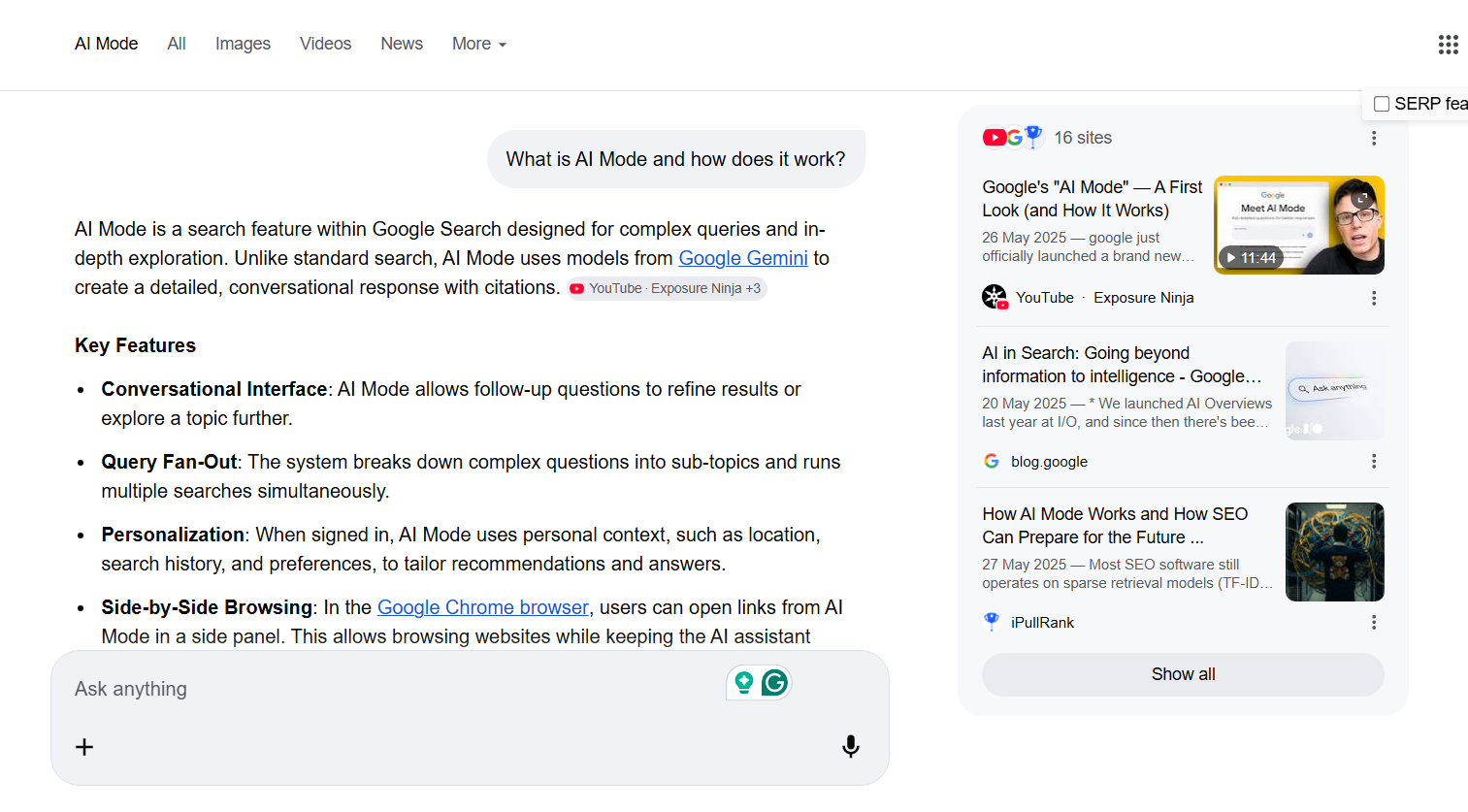
Google describes it as its “most powerful AI search experience,” designed especially for complex questions, comparisons, and deeper exploration.
In other words:
AI Mode is what happens when Google Search and an AI assistant are combined together.
A user can type, talk, or use images to ask a question, then continue the conversation without starting over from scratch. That makes AI Mode much better suited to messy, multi-part, real-world queries – the kind of searches people don’t always express neatly in a couple of keywords.
As of today, AI Mode is available broadly in more than 200 countries and territories, though some advanced capabilities are still restricted by market, device, subscription plan, or Search Labs status.
How is AI mode different from AI overviews?
Although people often lump them together, AI Mode and AI Overviews are not the same thing.
AI Overviews are AI-generated summaries that appear within the regular Google results page, but only when Google decides they add value to the classic SERP.
They often act as a quick snapshot.
AI Mode, on the other hand, is a more immersive search mode built for back-and-forth exploration.
It’s designed for questions that need more reasoning, more comparison, or more follow-up. Google has also been blending the two experiences more closely – for example, users can now jump into AI Mode conversations directly from AI Overviews on mobile.
A simple way to think about it:
- AI Overview = “Give me the gist.”
- AI Mode = “Let’s keep going.”
That distinction matters for SEO because AI Mode usually implies a longer query journey, more hidden sub-queries, and more opportunities for different pages to surface as supporting links.
How does Google AI mode work?
At a high level, AI Mode combines Google’s Gemini models with Google Search’s existing information systems.
Google says AI Mode uses a “query fan-out” technique, which means it breaks a question into subtopics and runs multiple related searches in parallel. It can then synthesize information from the web, the Knowledge Graph, shopping data, and other sources into one response.
So if someone asks a complicated question like:
“Which laptop is better for design work, battery life, and occasional gaming under $1,500?”
AI Mode is not just matching that one exact sentence to one page.
It’s likely splitting the problem into smaller pieces – price, design performance, battery, gaming, product comparisons, maybe even current shopping data – and building an answer from there.
That’s exactly why AI Mode is better at nuanced searches than a classic keyword-to-page match.
Google also says AI Mode is rooted in its core quality and ranking systems. At the same time, it uses newer reasoning techniques to improve helpfulness and factuality.
When Google doesn’t have enough confidence in the AI response, it can fall back to a more traditional set of web results.
That’s an important nuance: AI Mode is not separate from Search. It’s layered on top of Search.
What can AI Mode do besides answering text queries?
Google has expanded AI Mode with features like:
- Search Live – which allows back-and-forth voice conversations and camera-based help
- Deep Search – which browses hundreds of sites and creates a more detailed cited report
- Personal Intelligence – which can personalize responses using connected Google apps
- Shopping features – including richer product discovery and, in some cases, direct purchase flows
- Canvas – which helps users organize plans and ongoing projects in AI Mode
Not every feature is available everywhere.
For example, Deep Search is still limited to Google AI subscribers in Labs in the U.S. according to Google’s help documentation, while Search Live has expanded globally to regions where AI Mode is available.
From an SEO perspective, this matters because AI Mode is moving beyond plain text answers.
It is increasingly multimodal, personalized, and task-oriented – which means websites may be cited, summarized, compared, or used as supporting evidence in more different ways than before.
That does not mean the SEO rules are completely new. But it does mean the context around them is changing.
Does Google AI Mode change SEO?
Yes and no. The short answer is: AI Mode changes search behavior more than it changes SEO fundamentals.
According to Google Search Central, there are no additional technical requirements to appear in AI Overviews or AI Mode.
A page simply needs to be indexed and eligible to appear in Google Search with a snippet.
Google also explicitly says there is no special structured data required and no need to create new machine-readable AI files.
That means the SEO basics are still the basics:
- Let Google crawl your pages
- Make them indexable
- Publish helpful, reliable, people-first content
- Provide good page experience
- Make key content available in text
- Use high-quality images and videos where relevant
- Keep structured data aligned with visible content
So no, AI Mode did not suddenly kill SEO.
But it did change the environment where SEO operates.
Users can ask longer questions, refine them with follow-ups, and stay inside Google for longer.
AI Mode also surfaces a wider and more diverse set of supporting links than a classic search experience. That likely means more zero-click behavior in some cases, but also more chances for the right page to appear for nuanced, long-tail, comparison-style journeys.
Is there any special way to optimize for AI Mode?
This is where a lot of articles go off the rails. Google’s official answer is basically: No special AI Mode optimization is required.
That means:
- no special “AI Mode schema”
- no llms.txt requirement
- no secret GEO markup
- no separate optimization checklist from Google for AI Mode specifically
However, that does not mean all pages have an equal chance of surfacing.
AI Mode still has to find, understand, trust, and use your content. So while the fundamentals haven’t changed, the best execution of those fundamentals matters even more.
Let’s break down what that looks like in practice.
How to optimize website for Google AI mode?
1. Make sure your pages can actually appear in Search
This sounds painfully obvious, but it’s still step number one.
If a page is not indexed, or if it’s not eligible to show a snippet in Google Search, it can’t appear as a supporting link in AI Mode. Google states this directly in its documentation.
So check the boring stuff first:
- Is the page crawlable?
- Does it return a 200 HTTP status?
- Is important content accessible to Googlebot?
- Is the page indexable?
- Can it appear with a snippet?
AI Mode starts with plain old search eligibility.
2. Don’t block the very content you want Google to use
If you want visibility in AI Mode, be careful with snippet controls.
Google says AI features in Search are subject to the same preview controls as Search more broadly. If you want to limit what can be shown, you can use directives like nosnippet, data-nosnippet, max-snippet, or noindex. But those controls can also reduce or remove your chances of appearing in AI features.
Also important: Google-Extended is not the control for AI Mode in Search.
Google explicitly separates these two ideas. Preview controls affect what can be shown in Search AI features; Google-Extended is about limiting AI training and grounding in some of Google’s other systems.
So if your goal is “show up in AI Mode, but control what gets previewed,” use Search preview controls – not the wrong robots setting.
3. Focus on unique, non-commodity content
This is probably the most important content takeaway.
Google’s own advice for succeeding in AI search experiences is to create unique, satisfying, original content that adds value.
Tomorrow’s most-copied GEO prompt:
“Write a non-commodity blog post as per this new Google slide. Make sure it has E-E-A-T.” pic.twitter.com/OoWF3knOw1
— Lily Ray 😏 (@lilyraynyc) April 23, 2026
It specifically warns against scaled AI content that adds little value and says content generated in bulk without usefulness can violate spam policies.
In practical SEO terms, this means generic rewrite content is a terrible bet.
If your page says the same thing as 20 other pages – in the same order, with the same claims, and no real expertise or first-hand insight – why should Google use it as a supporting source in AI Mode?
Your safest play is to build pages with:
- Original explanations
- First-hand experience
- Strong examples
- Clear product or topic comparisons
- Updated facts
- Useful visuals or demonstrations
- Genuinely helpful conclusions
AI Mode is a terrible environment for copycat content.
4. Put important information in plain text
Google says important content should be available in textual form. That matters for Search generally, and it matters for AI Mode too.
So if your best answer is hidden in:
- an image with no context
- a video with no transcript
- an accordion Google can’t access properly
- a JS-rendered section that fails to load
- a downloadable file with no HTML equivalent
…you’re making Google’s job harder than it needs to be.
This is one reason clear subheadings, short answer blocks, comparison sections, FAQs, and descriptive summaries work so well.
Not because Google said “format content for AI Mode this way,” but because these structures make your content easier to understand, extract, and cite.
5. Structure pages for comparisons, subtopics, and follow-up questions
AI Mode is especially useful for exploration, reasoning, and complex comparisons, and that it uses query fan-out across subtopics.
That gives us a pretty obvious editorial hint: Create content that helps with those exact jobs.
For example, instead of publishing a page that only targets one shallow head term, build pages that also answer:
- what it is
- how it works
- pros and cons
- alternatives
- pricing or trade-offs
- common mistakes
- when to use it
- when not to use it
This is one of the biggest real-world shifts for SEO in AI Mode. You’re not just trying to match a keyword anymore.
You’re trying to be useful across the follow-up journey.
6. Support your content with strong images and videos
Google explicitly recommends supporting textual content with high-quality images and videos where applicable. It also continues to publish best practices for image and video SEO.
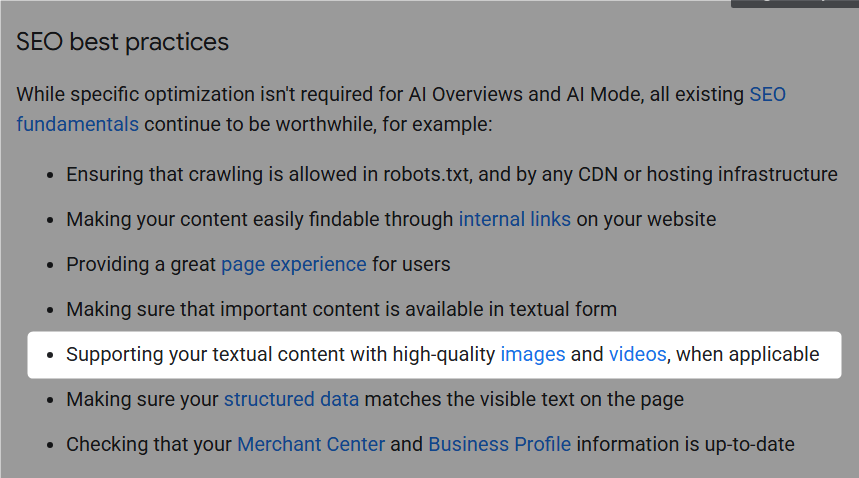
That’s even more relevant now that AI Mode is becoming more multimodal through things like Search Live, camera input, visual layouts, and richer response formats.
So if a topic benefits from visuals, add them. Not because “images rank in AI Mode.”
But because useful media makes your page stronger, more understandable, and more complete.
7. Use structured data (but don’t expect magic)
Structured data is still useful – it helps its systems understand your content and make pages eligible for certain search features. But it also says there is no special schema required for AI Overviews or AI Mode.
So the right mindset is: Use structured data where it genuinely applies, not as an AI Mode hack.
That means things like:
- Product
- Article
- FAQ
- Organization
- LocalBusiness
- VideoObject
…if they fit your page and match visible content. Good schema can support understanding. Bad or inflated schema can just create problems.
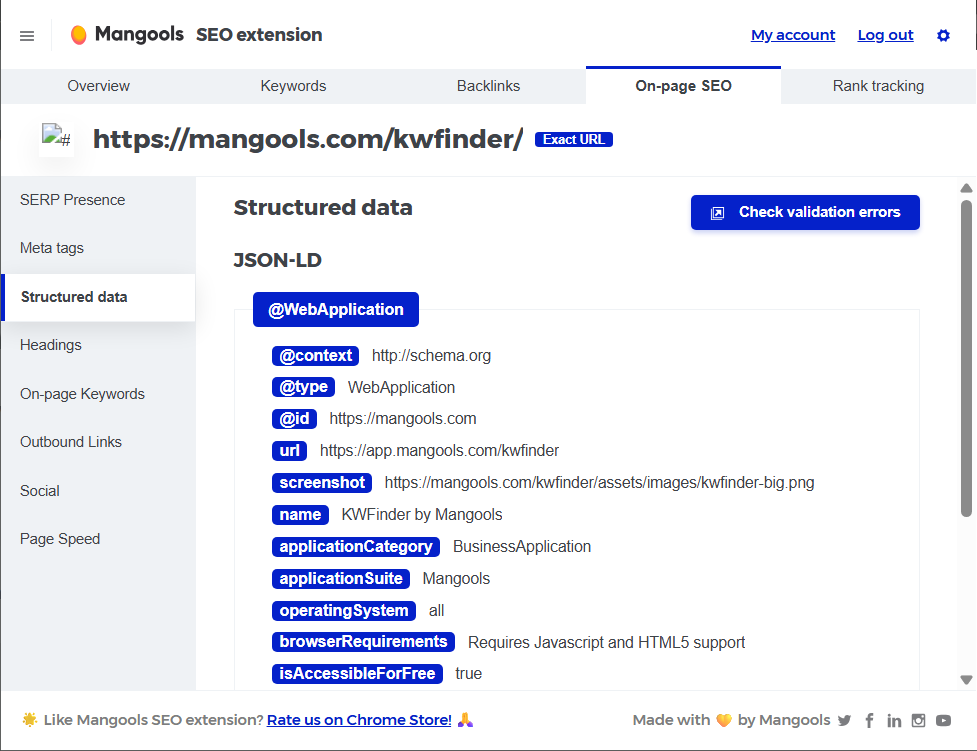
Tip: You can use our free Mangools browser extension to check whether your schema markups were implemented properly on you website
8. Keep your local and ecommerce data up to date
Google specifically calls out Merchant Center and Business Profile information as worthwhile to keep current for AI features in Search.
That’s a pretty strong hint for local SEO and ecommerce SEO.
If AI Mode is helping users compare options, find places, evaluate products, or narrow choices, then accurate commercial data matters a lot.
So make sure your:
- product data is current
- prices and availability are accurate
- merchant feeds are healthy
- business hours, categories, and profiles are correct
- location data is consistent
For many businesses, AI Mode won’t just be an informational SERP feature. It will be part of a shopping and local discovery journey too.
9. Strengthen internal linking and topical discoverability
Make sure that your content is easily findable through internal links.
That advice becomes even more valuable in AI Mode because your supporting page might not always be your homepage or your top-level commercial page.
It may be a deep article, a comparison page, a how-to guide, or a niche explainer.
Internal linking helps Google understand:
- what your important pages are
- how your topics connect
- which pages support which entities or subtopics
- where users should go next
In other words: If your site architecture is a mess, AI Mode won’t magically save you.
10. Improve page experience for the visitors who do click
Google keeps repeating this one, and for good reason: great content on a bad page is still a bad experience. It recommends strong page experience across both classic and AI search results.
That includes things like:
- mobile usability
- clear layouts
- fast loading
- easy access to the main content
- low friction once users land on the page
And here’s the strategic part: Clicks from AI features can be higher quality, with users more likely to spend more time on the site.
So chasing raw click volume alone may become a weaker KPI than engagement, lead quality, or conversions.
What should you not do for AI Mode?
a) Don’t invent fake technical requirements
You do not need:
- a special AI Mode sitemap
- a separate AI crawler file
- custom “AI Mode schema”
- an llms.txt file for Google Search visibility
- brand-new markup invented by someone on LinkedIn last week
If Google wants a new requirement, Google will document it. Right now, it hasn’t.
b) Don’t publish scaled AI content just to cover more keywords
Google’s guidance on generative AI is pretty clear: using AI to help research, organize, or improve content is fine, but generating lots of pages without adding value can violate spam policies.
So yes, AI can help your workflow.
But no, “publish 500 low-effort pages because AI Mode likes more content” is not a strategy. It’s a future cleanup project.
c) Don’t obsess over clicks alone
Because AI Mode answers more directly and supports follow-up exploration, some traffic patterns will naturally change.
You can look beyond clicks and pay attention to things like conversions and time on site. That doesn’t mean traffic no longer matters.
It just means traffic alone is a weaker proxy than it used to be.
How to measure AI Mode performance
This is where things get a bit annoying.
Sites that appear in AI features are reported in Search Console within the Performance report under the Web search type.
It also documents that AI Mode clicks, impressions, and positions are counted, and that a follow-up question in AI Mode is treated as a new query.
The catch?
You still can’t neatly isolate “this came from AI Mode” versus “this came from classic web search” in standard GSC reporting.
Also, data from Search Labs experiments is not included.
So the best practical setup right now is:
- Use Search Console – for overall query, page, impression, and click trends in Web search.
- Use GA4 or another analytics tool – to watch post-click quality metrics like engagement time, conversions, leads, signups, or revenue. Google explicitly recommends combining Search Console and Analytics data.
- Watch brand demand and long-tail query growth – as supporting indicators. This part is more of a strategic inference, but it fits how AI Mode encourages longer, more specific searches and deeper follow-up journeys.
Tip: If you’re tracking classic rankings, keep doing it – but don’t confuse that with full AI visibility. They overlap, but they’re not identical anymore.
How to control content in AI Mode?
If you want to manage how your content appears in Google’s AI features, Google points to the same controls used in Search more broadly.
These include:
- nosnippet
- data-nosnippet
- max-snippet
- noindex
These controls help limit or prevent snippet-level use of your content in Search experiences, including AI features.
Meanwhile, if your concern is AI training and grounding in some of Google’s other systems, Google tells site owners to look at Google-Extended instead.
That distinction is crucial. A lot of site owners mix these up.
Is Google AI Mode the future of search?
At this point, it’s hard to argue otherwise.
Google launched AI Mode as a deeper AI search experience in 2025, expanded it internationally, upgraded its models, blended it more tightly with AI Overviews, and kept shipping new features on top of it. That is not what a side project looks like.
But here’s the good news: You do not need to throw away SEO and start from zero.
If anything, Google’s own documentation keeps reinforcing the opposite message:
- make your content crawlable
- make it indexable
- keep it snippet-eligible
- write original, useful pages
- structure them clearly
- support them with good UX, media, and accurate markup
So the smartest way to think about AI Mode is probably this:
It’s not a replacement for SEO fundamentals. It’s a stress test for how well you do them.
And the sites that will win are not the ones chasing made-up AI hacks. They’ll be the ones publishing the clearest, strongest, most helpful pages on the web.
